AWS Fundamentals: AWS Cloud-Native
No programming is required, as most of the things are done by AWS Management console. I took this course, https://www.coursera.org/learn/aws-fundamentals-going-cloud-native.
Q. What is AWS Cloud ?
The one that we’re going to go with is the idea of an on-demand, pay-as-you-go, IT services that are delivered over the internet. Each one of those parts are important. The idea of an on-demand service, that you don’t have to make any advanced contracts with us, you don’t have to let us know what’s needed. The moment you need services like storage and compute or networking, they’re available immediately without any advanced contract, which goes the same as pay-as-you-go. That, you don’t have to have any prepaid tier, there’s no minimum requirement needed to be part of AWS. Delivered over the internet, means it’s secure and available anywhere for you and your business.
Additional information is available at: https://aws.amazon.com/what-is-cloud-computing/.
Q. Is it a substitute for on premise devices ?
Everybody needs compute, everyone needs storage, everyone needs identity management. AWS exists to eliminate those undifferentiated heavy lifting tasks that your IT department needs, that everyone’s IT department needs. This means your business can spend time working on what is strategically unique to you rather than repetitive common tasks that everyone has to do. There are so many of services that AWS offers,
- compute power for all your calculations
- storage of all different types
- networking that allows you to have your own private network, while at the same time allowing it exactly who you want to have be part of your application.
- security using standard encryption algorithms
- automation suites designed to deploy all of your applications, all of your databases, all of your environments automatically.
There are over 150 unique services at AWS, they keep on adding services based ton customers needs. The AWS Partner Network, APN, along with the AWS Marketplace, can provide on-demand solutions, pay-by-the-hour solutions, that will allow your company to get exactly what it needs, when it needs it.
Details about various points :
AWS Infrastructure :
Q. What is a region ?
A Region is a geographically self-contained area where all of the resources you need for your application, all the compute, all the storage, are contained. It’s going to be inside a single country boundary bounded by a single set of laws, and they are right now located all around the world. Every Region is designed to be self-contained to have all the assets you need to run your application,
Four specific conditions to select the right region:
1. latency :
So, if speed to your customer is your priority, then this is the option. Now if my blog readers live in India, then it would make sense to get the Mumbai region, simply because speed of light is going to be a lot close. I could run it in Oregon region as well, but the distance around the globe to get to your customers is going to cause that extra bit of lag that is simply unavoidable.
2. price:
So, if budget is one of your strong considerations, you might look to one of cheaper region even though the latency may be more. Not every Region is priced the same, because each different country has their own set of tax laws, their own financial situations, you’ll find the exact same services in different Regions may have different costs. Well Amazon does give you an estimate of your projected cost.
3. compliance:
But legal restrictions may change the entire conversation altogether. You might have specific United States HIPAA requirements, or you might have European GDPR requirements, or let’s say, you actually have a business it’s running in Germany. In which case you might be required by law, based on the type of load you’re running, that you must run in the Frankfurt data center. While you’ll have great latency because your customers are in Germany anyway, that this compliance outweighs any other consideration because of legal restrictions.
4. service availability:
Amazon tries to roll every feature out to every Region, but sometimes a brand new feature gets released. For example, at re:Invent, they often release dozens of brand new services, and those may take a few months to actually get into every Region around the globe.
Q. Why a region ?
At AWS a region is a collection of availability zones. Now you can think of an availability zone as if it was a standalone data center. Now the truth is at AWS an availability zone might actually be more than one data center. For us this single object while it might be two or three buildings and might be spread across a parking lot we call this one availability zone because it’s logically treated as that. Inside a region, Amazon always has at least two availability zones separated by miles of distance.
So a region is made up of multiple availability zones. And you don’t have to worry about the distance between them because AWS connects those availability zones with a proprietary high speed fiber network, multiple lines between every availability zone so you can treat it as a single area. But you run your application simultaneously across all of the availability zones
Q. What if there is a cyber attack or a natural calamity ?
The idea is it doesn’t matter what might happen to an availability zone, because maybe it’s not a cyber attack this time but there might be some other natural disaster, a hurricane, a tornado, an earthquake that they don’t want you to worry about. It doesn’t matter if there’s a temporary loss of connectivity to an availability zone because your application runs in both of them at the same time. This is how you can not only be effective, be scalable, but also highly available all while running in a single region of your choice. However remember, Resources aren’t replicated across AWS Regions unless you do so specifically.
Detailed information about Availability Zones can be found here.
Computation in AWS Cloud :
Q. what is Compute services ?
In order to power your business, you need some sort of compute capacity available to you to run applications.
In a traditional environment :
- estimate hardware to support the capacity ,and stand up the computer or server to run your application on.
- once you deploy your application to those servers
- you need to maintain the physical and software perspective
- one of the problems might be, if you underestimate or overestimate the resources.
- if you underestimate then it will cause latency
- if you overestimate then it will be costly
In a cloud environment:
- allows you to provision and consume raw compute or server capacity over the internet with pay-as-you-go pricing.
- This would take away the burden of standing up and maintaining those physical servers, while still allowing you to have the control over what type of hardware you need to run and the software that runs on top of it
- These compute services can easily eliminate the pain of under-provisioning or over-provisioning resources by offering flexible, scalable, and configurable compute resources in the cloud to meet your specific needs.
- AWS also offers managed compute options.
- amazon light-sail
- container services like ECS or EKS
- AWS Lambda lets you run code without provisioning or managing servers.
Details about the full range of AWS compute services can be found here .
1. Amazon Elastic Compute Cloud (EC2):
In Traditional way :
- you would have to purchase those machines,
- wait for the delivery of those machines,
- install them, lay down the networking and storage systems for those servers,
- then maintain that infrastructure to have any of their applications running.
In EC2 way :
- EC2 allows companies to provision servers on demand without acquiring massive capital to build out their compute infrastructure. In other words, if you need a server, you can just launch one, and it’s available to you in minutes.
- EC2 instances are flexible, and you configure them to meet your needs.
- You can commission one or many instances easily, and at the end of the billing cycle, you only pay for what you use. When you no longer need an instance, terminate or stop that instance, and you will stop incurring charges.
- The configuration of EC2 extends to the platform that you want to run. AWS supports a range of operating systems including Linux, Ubuntu, Windows, and more.
- To select the operating system, you choose an Amazon Machine Image, or what we call an AMI.
- An AMI contains information about how you want your instance to be configured, including the operating system and possible applications to be installed on that instance. You can launch one or many instances from a single AMI, which would create multiple instances that all share the same configuration.
- beyond the operating system, you can also configure the instance type and size, which correspond to the amount of compute, memory, and networking capabilities available per instance.
- this allows you to control the underlying hardware and the capacity of that hardware with just a few clicks or lines of code. .
Use cases for EC2 :
- Different types of hardware are best fit for different situations. Each instance type is a grouping of hardware technology that are optimized for various use cases. The instance types you can choose from include compute optimized, memory optimized, storage optimized, and more.
- If you decide that you want to resize your EC2 instance, that isn’t a problem in the cloud either. EC2 is a resizable resource with a few clicks in the console, or it can be done programmatically through an API call.
- You can spin up servers for a short amount of time to run experiments and find optimal configurations for your applications. This ability to adapt to change and act on insights into your fleet of instances is very powerful in achieving a cost-effective and performant system.
Virtual servers are not a new thing, but with the flexibility and low-cost nature of EC2 instances, the ease of provisioning servers allows for programmers and businesses to innovate more quickly.
Steps to launch an EC-2 Instance :
- Select the underlying hardware for EC2
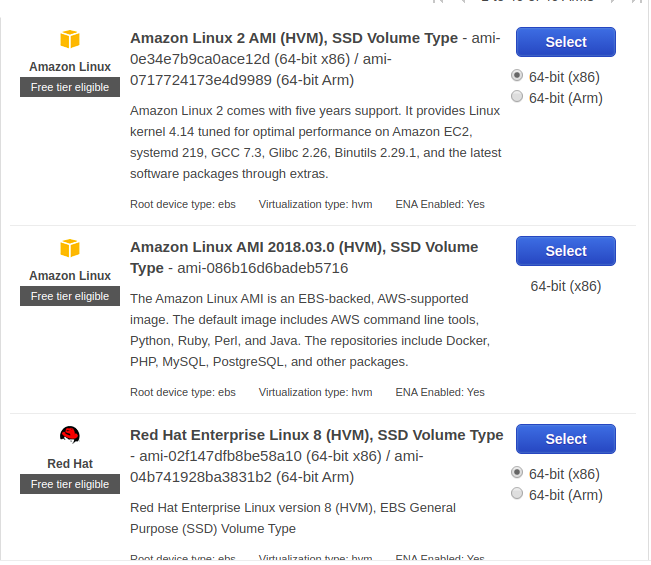
2.Select an AMI
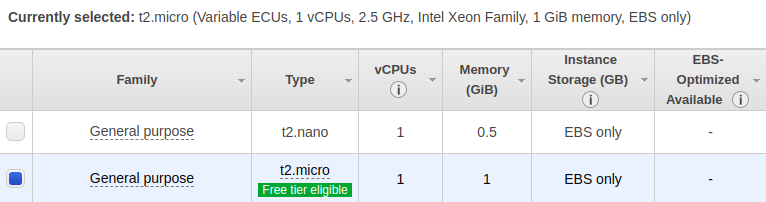
3. Running the file present
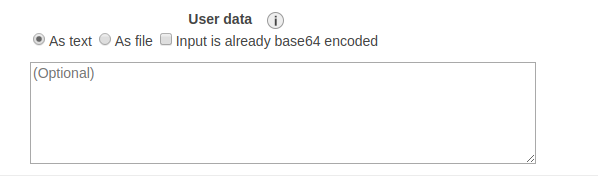
4.Storage option

5.Encryption option

Details on the features and cost of Amazon EC2 are available at: https://aws.amazon.com/ec2/
2. Amazon Lightsail :
It has a number of pre-built options, you simply select, launch, and you’re done. For example, you might just want a WordPress site. Lightsail has one already built for you. All you have to do is select it, and for a few dollars a month, all of the management is taken care of on AWS’s side.
The key part to Lightsail is AWS takes care of all the choices that now you don’t have to make. Remember, the reason AWS exists is to help eliminate your undifferentiated heavy lifting. So, AWS automatically provides a secure network, SSD storage, any load balancing you need. Amazon takes care of all the backups and compute all these things that make up those pieces of your application, now they are just there for you, all you have to worry about is the content.
Details on Lightsail and the 30 day trial are available at: https://aws.amazon.com/lightsail/
Networking on AWS :
1. Amazon virtual private cloud(VPC) :
To understand VPC, we need to accept the fact that the point of VPC is to provide a frame, to provide a box that all of your application lives inside, and the idea is nothing comes in the box, nothing gets out of the box, without your specific permission, and whether you’re filtering by network protocol, or port, or IP address, or by user or other information, you maintain complete control of all the assets inside your VPC.
When you create a VPC, you also then divide the space inside the VPC into subnets,
In a traditional way , subnets might be used to gather up servers or instances that need to talk quickly to each other.
In the case of AWS, subnets are primarily used to determine access to gateways, as well as to isolate specific traffic that you don’t want to talk to each other or do want to talk to each other.
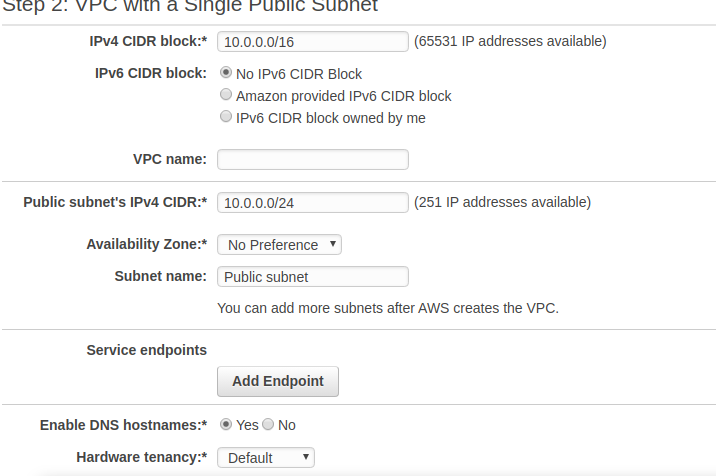
To build the VPC, you only have to declare two specific things :
- what Region you’re selecting, and remember we’ve already talked about the reasons why you might choose one Region over another.
- the IP range for the private IPs of everything that’s going to run inside this VPC.
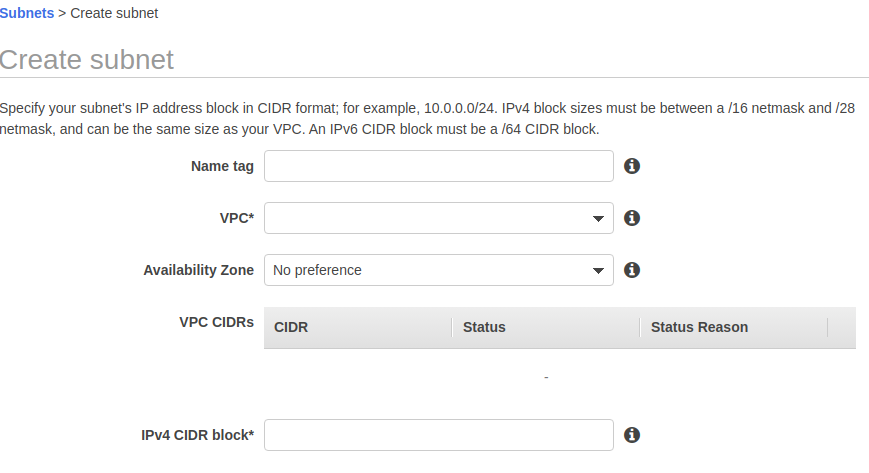
The subnet is a subset of the IP ranges for the VPC itself, and we’re going to want more than just one subnet,
1.select a VPC configuration
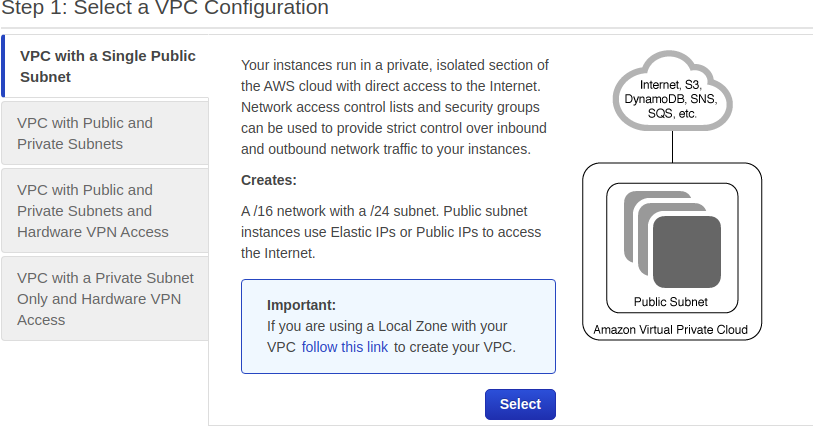
2.decide the two above specified conditions
CIDR Notation ?
An important concept that’s used in networking on AWS is CIDR, or Classless Inter-Domain Routing. CIDR network addresses are allocated in a virtual private cloud (VPC) and in a subnet by using CIDR notation. A /16 block provides 65,536 IPv4 addresses. A /24 block provides 256 addresses. See this article for more information about CID
Default VPC ?
In each Region, AWS will provision a default VPC. This VPC has a /16 IPv4 CIDR address block of 172.31.0.0/16. This provides 65,536 private IPv4 addresses. In addition, there will be a /20 subnet that is created for each Availability Zone in the Region, which provides 4,096 addresses per subnet, with a few addresses reserved for AWS usage. The route table that is associated with the default VPC will have a public route, which in turn is associated with a provisioned internet gateway.
VPC stops all traffic in and all traffic out, and if we’re going to put a web server in there, well, that means nobody can talk to it. So, we have to add a gateway, and the gateway is called the internet gateway, or the IGW, the internet gateway. To solve this, we create the internet gateway, and attach it to the VPC and then we’ll create a route table and associate that with the subnet, so that any communication that wants to talk to assets in this subnet, can come in and out of that IGW. Then we create an EC2 instance in the subnet.
But a database does not go, shouldn’t go, in the same public access subnet where web servers are, because I never want anyone from the outside to access a database directly. So, we’re going to make another subnet inside my VPC. But this subnet will not have access to the IGW. So this subnet is what we call a private subnet. You create a subnet, but you don’t assign IGW access to it .
Our application will be able to connect to the database because they live inside the same VPC. But nobody from the outside will be able to connect directly to that database.
Optimal solution :
I want to talk about high availability. So for that we want to move beyond just one Availability Zone, into a Multi-AZ strategy. So what we’re going to do, is we’re going to create two new subnets, one public and one private, in a separate Availability Zone. This is going to give us that high availability that we need.
We need to associate our route table that allows us to route internet traffic to our public subnet that we just created in our second Availability Zone. So to do that I’m going to select Route Tables. I’m going to find our public route table here and then I’m going to select Subnet Associations. At this point, we need to edit this and associate the new public subnet. So I will select Edit, find public subnet number two, click Save, and that’s it.
You doesn’t have to change the VPC because the VPC, by definition, already is a multi-Availability Zone structure. All you had to do was add in a new public subnet, which is going to be associated with the same IGW, and created a new private subnet all in the other Availability Zone. And this one like my other private subnet, does not have IGW access. Now, the last thing is to launch a new EC2 instance in this private subnet, and then change my RDS to a Multi-AZ RDS. That’s going to have a standby, running in my other Availability Zone.
But do you really want your customers to have to choose which EC2 instance they log into? Of course not. That’s what load balancers are for. So one more piece to put in here as part of AWS networking is an elastic load balancer, or an ELB.
To launch an ELB and associate that ELB with both of the EC2 instances, so that it doesn’t matter which one gets the traffic. They’re both going to get an even amount of traffic distributed automatically by the elastic load balancer.
We’ve got all the pieces you need to run a successful web application. You’ve got your VPC, the virtual private cloud. That is going to isolate your traffic from anyone else inside AWS. You’ve got traffic coming in from the public IGW that is going to go through the elastic load balancer and be distributed to either one of the EC2 instances. The instances are going to all talk to the database. The master database has a standby database in the event that something goes wrong. Well, the only thing that we haven’t talked about is what if you want to communicate to your objects, but you don’t want to go to it over the public internet?
There’s one more type of gateway we can add into your VPC and that’s called a virtual private gateway. And a virtual private gateway, or a VGW, can be created and attached, and this can even be associated with your private subnets. So that if you’ve got a DBA, that is connecting over your own on-premises data center.
Details on Amazon VPC can be found here: https://aws.amazon.com/vpc
Storage :
Building and maintaining your own storage repository is complex, expensive, and time-consuming. Like computing, you don’t want to under-provision or over-provision for your storage needs. AWS storage options enable customers to store and access their data over the internet in a durable, reliable, and cost-effective manner. You can consume as much or as little storage capacity, as needed, without having to estimate what your storage needs will be ahead of time.
S3 is what we call object-level storage, whereas RDS runs on block-level storage. Object-level storage works like this.
If you have an image,and you want to update that image, you have to update the entire file. So the whole file’s going to change. For object storage, we use Amazon S3. This provides highly durable and scalable stores for items like images, videos, text files, and more.
In contrast, databases like Amazon RDS run on top of block-level storage.
How this works is if we wanted to change the location for a contact, we could just change the corresponding blocks. We do not need to update the entire data file for every single change. Storage for databases and EC2 instances use block-level storage, like Amazon Elastic Block Storage, or EBS. For file storage and shared file systems, Amazon offer Amazon Elastic File System, or Amazon EFS.
[Image no longer available]
1.Elastic Block Storage (EBS):
When you launch your EC2 instance, you’re going to need some kind of block storage to go with it. And AWS has racks of unused storage that you can provision to sizes as large as you need up to many terabytes in size. When you launch the EC2 instance, the boot volume can attach directly to your EC2 instance, as well as the data volume. These volumes live independent of the EC2 instance themselves. In fact, they may already exist before your EC2 instance launches. When it launches, it simply finds the volume and attaches it the same way you might have an old drive from a laptop. That when you get a brand new laptop, you attach, and you’ve got the same old data.
This EC2 instance, when it connects to the EBS volumes, now has a direct communication to these volumes. Nobody else can talk directly to them. It’s how we maintain secure communications at all times. The EBS volumes have a life-cycle independent of EC2. What does this mean?
Let’s say that this EC2 instance is part of a developer machine that over the weekend, nobody is using because your developers go home over the weekend. So, during those 48 hours, 72 hours, there’s no reason to be paying for EC2 because nobody is using it. All you have to do is simply stop the instance. When you stop EC2, the EBS volumes survive. They just simply are no longer connected to the EC2 instance. Then, Monday morning comes around, your developer starts up an EC2 instance, and a brand new instance is created. It reattaches those same EBS volumes the same way you would simply shut down your laptop over the weekend and start it again on Monday. But over the weekend, you didn’t have to pay for EC2.
I could take your hard drives out of your existing laptop and put it in a stronger laptop, at AWS, you can simply provision a newer, bigger EC2 instance, stop the old EC2 instance, and then just attach the volumes to your brand new EC2. So, now, I’ve got the same boot volume, the same applications, the same data only running newer, bigger, stronger.
Amazon EBS provides a range of options that allow you to optimize storage performance and cost for your workload. These options are divided into two major categories: SSD-backed storage for transactional workloads, such as databases and boot volumes (performance depends primarily on IOPS), and hard disk drive (HDD)-backed storage for throughput-intensive workloads, such as MapReduce and log processing (performance depends primarily on MB/s).
Full details on Amazon EBS are available here: https://aws.amazon.com/ebs
2.Amazon simple storage service (S3) :
Amazon Simple Storage Service, or S3, is a highly scalable and durable object storage solution, for storing and retrieving any amount of data. S3 is a simple and cost-effective way to store and retrieve your data at anytime, from anywhere on the web. S3 is a very popular service that is used for scenarios such as basic object storage like images or text files, storage of backups, application file hosting, media hosting, and many other use cases. It can be used to store virtually any type of document or object at a large scale, as S3 has an unlimited capacity for your storage needs. Your storage needs are going to grow and change over time, and S3 is built for durability and scalability. S3 offers 99.99% availability with 11 nines of durability. They store three copies of your data redundantly across AWS facilities within the Region that you selected. With this level of durability, S3 is often used as a place to comfortably store backups.
To get started with S3, there’s a few key concepts that you need to understand,
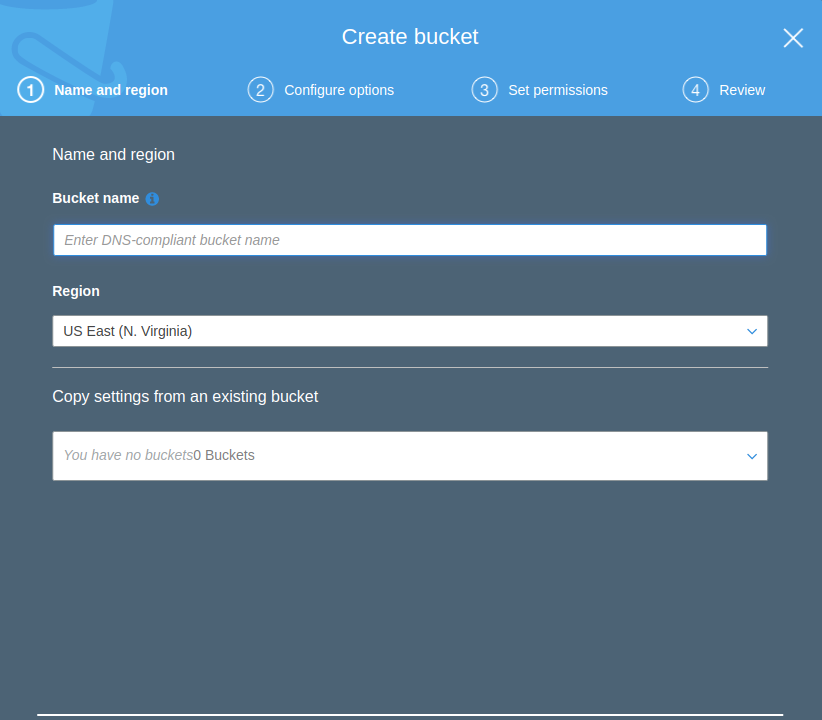
- objects are stored in what we call buckets. Buckets are repositories for objects that live in a specific Region. Even though S3 is specific to one Region, bucket names need to be globally unique across all AWS accounts and must be DNS-compliant. The reason for this is that your objects are accessible over HTTP or HTTPS. So when you create a bucket, Amazon provides you with a URL to that bucket
- once you have your bucket, you can then start to upload objects into that bucket. Those objects are then also accessible over HTTP or HTTPS. Let’s say we have an image. This image is called picture.jpg. Now that we have an object, we can store it in our S3 bucket. Once our object is stored in the bucket, we will get a URL for that object. You’ll notice that the beginning part of the URL is your bucket name, and the end part is going to be your key, or your object name.
- S3 provides secure object storage that you control. By default, when you upload an object into a bucket, it is private. That means if you want to share the URL to the object with another person or application, you need to configure the permissions on that object to allow access. You can control bucket and object access through access control lists, and bucket policies. You can further secure access to S3 by enforcing HTTPS-only connections.
- you can write, read, and delete objects containing information from 1 byte to 5 terabytes of information per object. Though the size of each object uploaded is limited to 5 terabytes, the overall size limit of the bucket is not limited, which allows for uncapped storage growth.
Full details on Amazon S3 can be found here: https://aws.amazon.com/s3.
3.Amazon Elastic File System :
Amazon Elastic File System (Amazon EFS) provides simple, scalable, elastic file storage for use with AWS Cloud services and on-premises resources. It is straightforward to use, and it offers a simple interface that allows you to create and configure file systems quickly and easily.
Amazon EFS is designed to provide massively parallel shared access to thousands of Amazon EC2 instances. This enables your applications to achieve high levels of aggregate throughput and IOPS that scale as a file system grows, with consistent low latencies.
When an Amazon EFS file system is mounted on Amazon EC2 instances, it provides a standard file system interface and file system access semantics, which allows you to seamlessly integrate Amazon EFS with your existing applications and tools. Multiple Amazon EC2 instances can access an Amazon EFS file system at the same time, thus allowing Amazon EFS to provide a common data source for workloads and applications that run on more than one Amazon EC2 instance.
Current details on Amazon EFS can be found at: https://aws.amazon.com/efs/
Database :
In a traditional way :
I would be responsible for everything from power and heating and cooling, racking and stacking the servers, maintaining the servers, so on, all the way up to the application itself.
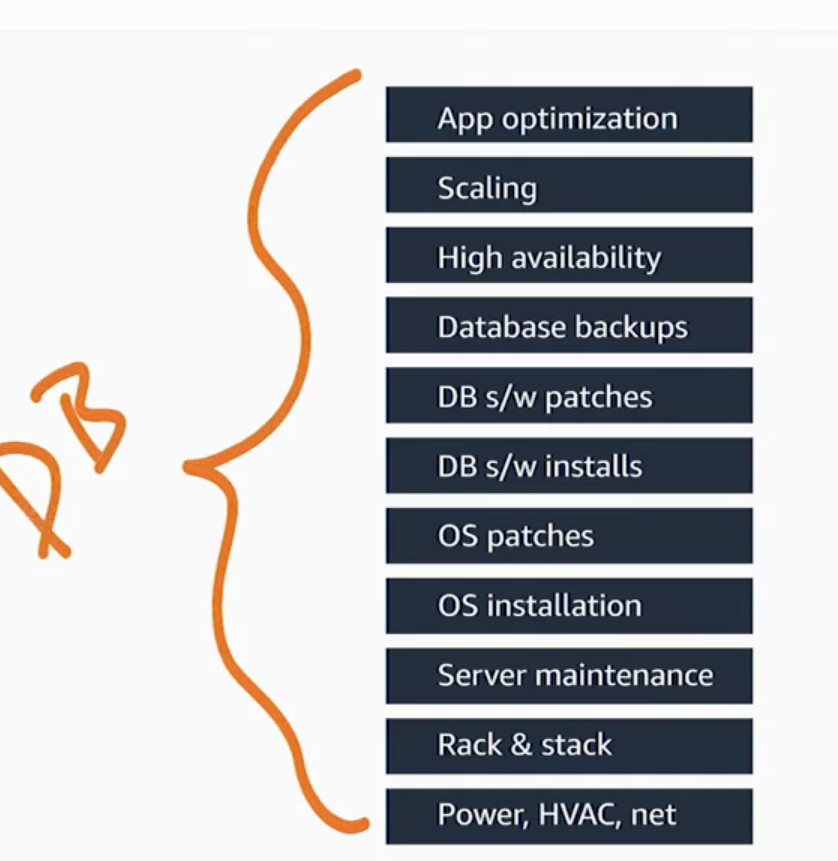
In EC2 way :
A large section of what you would have to do on-premises, you don’t have to worry about in AWS. You don’t have to worry about provisioning the hardware as far as racking and stacking it, maintaining the server. Even installing the operating system is taken care of by simply running your system on EC2.
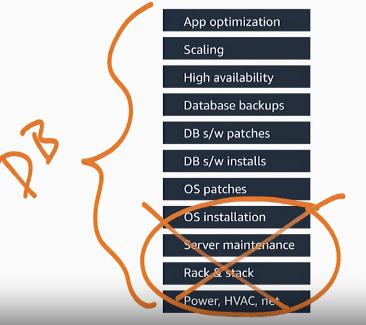
Amazon Relational Database service (RDS) :
AWS takes care of all of the rest of the heavy lifting that otherwise your DBA would be in charge of. So no longer does she have to worry about managing the high availability, or managing backups, or taking care of scaling. But all of these pieces now get taken care of because of the Relational Database Service. And the only thing that your DBA needs to worry about is taking care of the application itself.
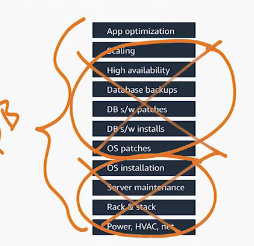
AWS has no access to the data. But all of the rest of the undifferentiated heavy lifting that goes into databases, AWS takes care of. Is RDS the perfect solution for everyone? You certainly may be in a case where you’re using a legacy database. Say you’re still running a Sybase shop, you’ll still run that on EC2. But as you look for ways to eliminate tasks from your team and let them focus on what they really prepare to do, RDS can certainly get rid of large portions that they don’t have to worry about anymore.
- The first question you get asked is what type of database do you want to launch ?, Whichever flavor it is, we’ve got the options here, including the Amazon Aurora database, which is a MySQL-compatible engine that is designed to work cloud-native, meaning it’s going to give you more power at less cost all native inside your VPC.
- If I’m using a MySQL database for a developer, I’m not worried about high availability. In that case, because a Multi-AZ strategy costs more, I’d absolutely go with the Dev option. But in this case, we’re going to be launching a production database. So by choosing the Production-MySQL, it’s going to automatically give us that Multi-AZ option. Now that we’re here inside the details, we can of course choose which database engine version you want, and there’s a wide range of different MySQL versions Amazon supports.
- You’ll see an option to choose a license model, but in MySQL, there is simply the general license that’s available. For some of our other flavors, you might have the option to bring your own license, or the special licensing agreements that you need, or use the pay-as-you-go option that comes with AWS.
- Additional options will be how large of a database do you want to start with, and this of course can be changed. If you want to start with a small database and then as demand grows, change it over time, that absolutely is one of the benefits of RDS.
- Now, we now can choose some settings that are specific to your database. This is going to be your initial login settings with the master username and password it’s going to be. Of course, Amazon recommends, that you change this once you get logged in, so there’s no concerns about anyone else but you having the master password.
- Now we simply choose which VPC, which subnet group, and we’re just going to go ahead and take the defaults out of this. Public accessibility? No, I don’t want this public. This is going to be my private database with a front-end instance. As far as anything else, what security groups we want? What individual database options?
- I absolutely want encryption. So in this case, we’re going to leave the default to Enable encryption.
- As far as backups go, you set up how often you keep the backups and how long you keep the backups.
- Monitoring, enhanced monitoring is going to give me additional information.
- Performance insights, all these options as default.
- On our maintenance contracts for AWS, we want to know if we want to enable minor version upgrades. Do we want to stay on this version, so it doesn’t automatically upgrade?
- And finally, Deletion protection, I absolutely want this one checked. I don’t want someone accidentally or inadvertently sending a delete command and having it accepted.
Amazon RDS is eligible for the AWS Free Tier. More details on pricing for Amazon RDS are available here: https://aws.amazon.com/rds/pricing/
Relational databases allow for medium to high amount of throughput and require rigid schemas to be in place. But what if you need massive amounts of throughput, but keep that low latency? Or what if your data model was simple enough, and you didn’t require the transaction-al support that relational databases had to offer? You might look into using a No-SQL database instead. Introducing Amazon DynamoDB.
Dynamo db :
DynamoDB is a fully managed, fast, and scalable No-SQL database solution that delivers reliable performance at any scale.
When you start using DynamoDB, you do not have to manage any of the underlying infrastructure running that database. When you need to start using DynamoDB,
- you simply create a table, define your throughput needs, and you can start populating it with your data.
- To compare this with Amazon RDS, with RDS when you need to use it, you define how much capacity you need in terms of memory and CPU.
- So you’re defining the underlying hardware that we’re running your database on. With Dynamo, you simply just tell us how much you need talk to that table by provisioning your throughput needs.
- With Amazon DynamoDB, you can start small, specify the throughput you need, and easily scale your capacity requirements in seconds, as needed.
- It automatically partitions data over multiple servers to meet your requested capacity. As your data grows, AWS handles the management of scaling your database. There is no limit on table size, which means you can store any amount of data.
- DynamoDB synchronously replicates your data across three facilities in an AWS Region to ensure redundancy and availability. So you’re protected from any chaos caused by any events that would temporarily disrupt connections to an Availability Zone
For more information, https://aws.amazon.com/dynamodb.
MONITORING APPLICATION :
Amazon Cloud-watch, you can monitor your cloud infrastructure intelligently. Cloud-watch will collect data from your cloud-based infrastructure in one centralized location. With this data, you can create statistics, which drive operational procedures using features such as Cloud-watch Alarms, which create alarms and trigger automated events based on those statistics.
Let’s consider this situation. You get reports from your user base that they’re noticing a latency in your services. Since you now have been made aware of an issue, you can start looking at your system to figure out what the cause of the issue is. Upon investigation, you realize that the CPU load is around 95 percent across all of your server instances.
In traditional way :
you would page an admin, who then launches another server to help bring the load down across the servers. The problem with this approach, manually responding to a problem, is that your users experience interruption before you can mitigate the disruption to your services.
In AWS way :
instead of waiting until hearing about latency from users, instead, you can create an alarm that says, if a group of EC2 instances has CPU over 60 percent for more than 5 minutes, trigger an auto scaling policy, automatically launch a new server into the pool, and alert an admin.
Cloud-watch Logs is a place where you can send your log files for viewing in the console, and to stream to other services, like Lambda or Amazon Elasticsearch for analytics. Cloud-watch is integrated with over 70 AWS services. You can use Cloud-watch to set alarms, visualize logs and metrics side-by-side, take automated actions, troubleshoot operational issues, and discover insights to optimize your applications. Getting started with Cloud-watch is easy and there’s no up-front commitment or minimum fee.
For more information, https://aws.amazon.com/cloudwatch/.
SCALING APPLICATION :
Load balancing :
Introducing Amazon Elastic Load Balancer (ELB), and the idea behind elastic load balancing is it is a regional service, that launches inside your VPC. When you launch it, you have got a number of flavors you can choose from based on your application needs, whether you just want pure network load balancing or sophisticated application-level load balancing, they can send to different parts of your application based on what it sees, but the fundamentals are the same.
The traffic comes in, and the elastic load balancer knows all of the different instances that are signed up to take traffic, and in fact if you have auto scaling set up, and more instances come online, then the elastic load balancer can absolutely send traffic to those as well. The advantage then is automatic traffic distribution, to the instances, and it doesn’t even have to come from external traffic.
ELB can also be used internally to help decouple instances. For example, you might have a front-end web server fleet, that then wants to communicate to an application tier. Instead of having each front-end web server know each application tier, you can simply have your elastic load balancer in between, take care of handling all those relationships.
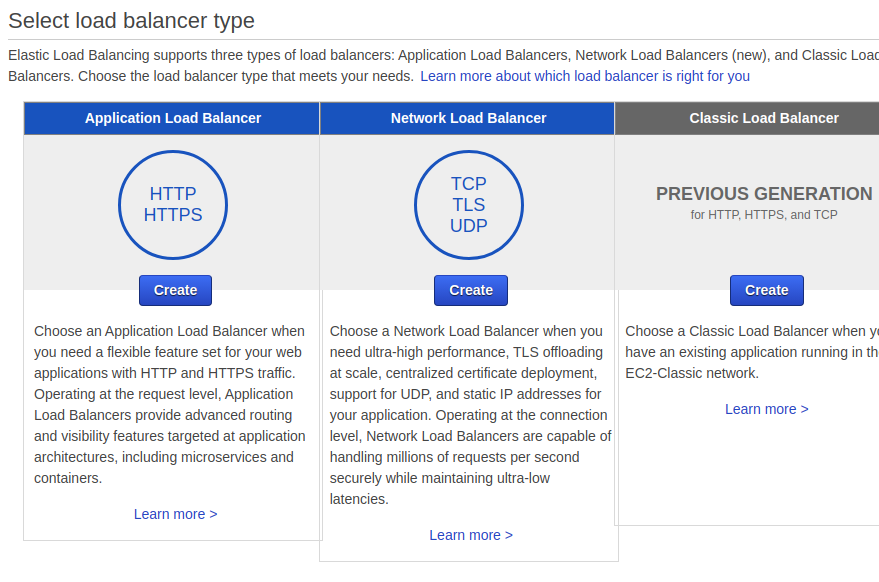
ELB offers three types of load balancers that all feature the high availability, automatic scaling, and robust security that are necessary to make your applications fault-tolerant.
- An Application Load Balancer operates at the request level (Layer 7), routing traffic to targets–such as EC2 instances, microservices and containers–within Amazon VPC, based on the content of the request. It’s ideal for the advanced load balancing of Hypertext Transfer Protocol (HTTP) and Secure HTTP (HTTPS) traffic.
- A Network Load Balancer operates at the connection level (Layer 4), routing connections to targets–such as Amazon EC2 instances, microservices, and containers–within Amazon VPC, based on IP protocol data. It’s ideal for load-balancing Transmission Control Protocol (TCP) traffic.
- The Classic Load Balancer provides basic load balancing across multiple Amazon EC2 instances, and it operates at both the request level and the connection level.
Auto scaling :
Previously, we built our application and launched it on two separate EC2 instances. Those EC2 instances lived in two separate Availability Zones and two public subnets. We then had our private subnets with our database instances in them. We also created an elastic load balancer. Our elastic load balancer distributed traffic across our EC2 instances.
Let’s imagine a scenario where our application starts to get really popular. As more people visit our application, the demand on our two web servers is going to go up. At some point, our two instances aren’t going to be able to handle that demand, and we’re going to need more EC2 instances. Instead of launching these instances manually, we want to do it automatically.
Auto Scaling is what allows us to provision more capacity on demand, depending on different thresholds that we set, and we can set those in CloudWatch. EC2 instances that are created inside an Auto Scaling group, meaning, they’re identical, they can launch as needed by the Auto Scaling engine, all connected through the elastic load balancer.
We can configure the scaling policies. So, for scaling policies, what we’re talking about here, is you can set up a scaling policy with CloudWatch that whenever your instance capacity reaches a certain limit or any other metric that you would like, you can add more instances to the pool, which would deploy more EC2 instances into your Auto Scaling group.
- You had your EC2 instances. Again, they’re part of the Auto Scaling group. They’re identical, they’re launched as part of the launch configuration.
- As they were put under stress, they all reported down to the CloudWatch engine, saying their CPUs are overloaded.
- CloudWatch went into an alarm state and told the Auto Scaling engine, “Give me more EC2 instances.” As they each came online, they all reported back to the elastic load balancer, they got traffic, ending up giving us all the scalability we need.
- Now, if we wait around long enough, what we would see is, as the CPU load dropped off, then one by one, they would each get terminated, because we no longer need them, bringing our state all the way back down to the basic two we need, the minimum number for this particular group.
- All of that done without any human intervention.
Security in AWS :
The idea is, at AWS, they talk about security as a partnership. There are things AWS is responsible for and things you are responsible to do, in order to keep your application safe and secure in the cloud. Take a look at your application not as a single object, but as a collection of pieces that together make up the parts of your app
Amazon provide the security elements to you and your auditors where compliance is needed. When you’re running EC2 on AWS, and you launch EC2 when you choose an AMI with an operating system, that guest operating system is a 100 percent in your control. This becomes the dividing line.
All of your user data, is controlled by you. This means, it’s your responsibility to think about things like, do you want encryption? AWS offers a wide range of encryption tools, whether it’s simply a bring-your-own-encryption to automatic server-side encryption on S3 and EBS. Or perhaps, you’d like a more robust managed keys, using AWS CloudHSM or KMS, the Key Management Service. That allows you to retain high level controls even when you’ve got security like a FIPS 140-2 compliance.
Think about RDS, the Relational Database Service, but in those cases, AWS is responsible for installing and maintaining, and keeping all the patches up to date. You or your DBA, doesn’t have to worry about the operating system or the application. In fact, there’s a different dividing line for RDS. You though, still maintain 100 percent control over the data itself, over the schema, over user access. Am I encrypted or not? Who has access to read it?
Just because you’re running on AWS servers, does not give us any visibility at all into your data. If you don’t trust that, don’t worry about trust, that’s what encryption’s all about. With enough encryption, you don’t have to worry about who else is running inside the cloud or anywhere else in the world.
[Image no longer available]
AWS responsibility
Security of the Cloud: Amazon is responsible for protecting the infrastructure that runs all of the services that are offered in the AWS Cloud. This infrastructure is composed of the hardware, software, networking, and facilities that run AWS Cloud services.
Customer responsibility
Security in the Cloud: Customer responsibility will be determined by the AWS Cloud services that a customer selects. This determines the amount of configuration work the customer must perform as part of their security responsibilities.
For more details about the Shared Responsibility Model, see: https://aws.amazon.com/compliance/shared-responsibility-model/
Cost Management :
To optimize costs, you want to establish best practices for cost management, and use tools to monitor and analyze costs over time. AWS offers multiple cost management tools through the AWS Management Console.
- The AWS Cost Explorer is a service that helps you easily visualize and understand costs and usage. AWS Cost Explorer also allows you to create reports
- AWS Budgets allows you to create alerts when your costs or usage exceeds a threshold over a specific time period. You define the time period, whether it be a week, month, or year, and you also define your thresholds. When you exceed the threshold, a notification can be sent out. So, you can begin to look into where you can start to reduce costs.
- AWS Trusted Advisor not only helps you reduce cost, but it also can help you increase performance, increase security, and optimize your AWS environment. Trusted Advisor is a powerful tool to help you identify areas of improvement in your account. we have a few different categories of things that Trusted Advisor can help you with. We have
- Cost Optimization
- Performance
- Security
- Fault Tolerance
- Service Limits.
Sources used to write this blog,
- https://www.coursera.org/learn/aws-fundamentals-going-cloud-native/home/welcome
- https://aws.amazon.com/training/
- https://docs.aws.amazon.com/index.html?nc2=h_ql_doc
Next blog in the series : https://programmerprodigy.code.blog/2020/06/03/aws-fundamentals-addressing-security-risk/