AWS Fundamentals: Addressing Security Risk
Hello, this is course 2 in AWS Fundamentals. It majorly focuses on security and organizations. The link for the course is, https://www.coursera.org/learn/aws-fundamentals-addressing-security-risk/home/welcome
Some of the topics have been covered in the previous blog, still I will try to explain them in brief.
Shared Responsibility Between AWS and Customer :
Security and Compliance is a shared responsibility between AWS and the customer. This shared model can help relieve customer’s operational burden as AWS operates, manages and controls the components from the host operating system and virtualization layer down to the physical security of the facilities in which the service operates. The customer assumes responsibility and management of the guest operating system (including updates and security patches), other associated application software as well as the configuration of the AWS provided security group firewall.
AWS responsibility “Security of the Cloud” – AWS is responsible for protecting the infrastructure that runs all of the services offered in the AWS Cloud. This infrastructure is composed of the hardware, software, networking, and facilities that run AWS Cloud services.
Customer responsibility “Security in the Cloud” – Customer responsibility will be determined by the AWS Cloud services that a customer selects. This determines the amount of configuration work the customer must perform as part of their security responsibilities.
For abstracted services, such as Amazon S3 and Amazon DynamoDB, AWS operates the infrastructure layer, the operating system, and platforms, and customers access the endpoints to store and retrieve data. Customers are responsible for managing their data (including encryption options), classifying their assets, and using IAM tools to apply the appropriate permissions.
See this page on the AWS website for more details: https://aws.amazon.com/compliance/shared-responsibility-model
[Image no longer available]
Q. What is Cloud Security ?
AWS provides these security services upon creation of your AWS account, but, as with any service-based model, AWS gives you the mechanisms to further secure your account and infrastructure. This means AWS readily provide services to secure your accounts, like IAM, or Identity and Access Management, and Amazon Cognito, which allows you to provision end user access to your applications. No matter how you deploy your IT infrastructure, on your own servers or on AWS Cloud, you, as an application owner, need to maintain adequate governance over the entire IT controlled environment.
There are a few practices you need to follow.
- understand compliance objectives and requirements.
- then you need to establish a controlled environment that meets those objectives and requirements.
- you need to understand the validation required based on your organization’s risk tolerance.
- you need verification of the operating effectiveness of your controlled environment.
- Now, when you build and operate your IT environment on AWS, it is a shared responsibility model between you and AWS.
- AWS’s part in this shared responsibility includes providing its services on a highly secure and controlled platform, and providing a wide array of security features that you can use.
- User responsibility includes configuring your IT environment in a secure and controlled manner for your purposes. AWS does communicate its security and control information to customers.
Take a virtual tour and see how AWS secures it’s data centers: https://aws.amazon.com/compliance/data-center/
IAM Roles for your organization :
When you first create the account, you’ll notice that you’re using the super user or root user. This means that you can do anything and everything in your account even deleting resources that you didn’t mean to. For that fact, the first best practice is to create individual user accounts for each user and provide them with relevant access.
The principle of least privilege access and likewise means to provision the minimum needed access policies. So that users can only perform the work they need to. You can create more users via the IM console by choosing a username, password, whether you want to access it via the console or programmatically. And then you add policies that stipulate the actual resources they have access to.
For example you want to create an admin user, you attach the administrator access policy, which is a JSON document that describes it.
{
  "Version": "2012-10-17",
  "Statement": [
    {
      "Effect": "Allow",
      "Action": "s3:ListAllMyBuckets",
      "Resource": "*"
    },
    {
      "Effect": "Allow",
      "Action": [
        "s3:ListBucket",
        "s3:GetBucketLocation"
       ],
      "Resource": "arn:aws:s3:::productionapp"
    },
    {
      "Effect": "Allow",
      "Action": [
        "s3:GetObject",
        "s3:PutObject",
        "s3:DeleteObject"
      ],
      "Resource": "arn:aws:s3:::productionapp/*"
    }
  ]
}
So after you create the user successfully, the console will show you the user name, the access key ID, the secret access key, and the password. So, you have to download these resources, because it will not be available later on the console. You can choose to download by clicking on the Download .CSV button
If we want to add another layer of protection apart from our username and password, multi-factor authentication (MFA) and it adds another verification check when you try to log in. This can and should be enabled for your root account along with each account you’re trying to protect. Essentially you’ll be prompted for a code once you’ve entered your username and password with the code coming from an application like Google Authenticator. A security key like a yubikey or even an actual token device such as a gemalto token.
Other practices I recommend are,
- use strong passwords to secure your accounts
- using roles and groups to assign permissions
- monitoring using Amazon CloudWatch and AWS CloudTrail
Let’s say you have multiple IT engineers that are tasked to manage AWS accounts and resources. As an IT manager, you would need to grant AWS admin access for your engineers.
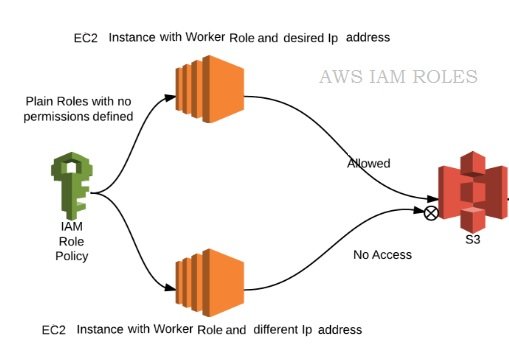
Q. How do we scale and automate AWS account creations? How do we make sure that each team and organization has the appropriate permissions to use the right AWS services and resources?
The solution is AWS Organizations. This AWS service can help you centrally govern your environment as we grow and scale. Using AWS Organizations, you can automate account creation and management, create groups of accounts to reflect business needs, govern access to AWS services resources in Region by policy,
- automate account creation and management
- create groups of accounts to reflect business needs
- govern access to AWS services resources region by policies
- set up single payment method for all AWS accounts
- share resources across accounts
Q. How does AWS Organizations work ?
Firstly, you will choose an AWS account as a master account. Then, you create an organization in this master account. Note that when you use Organizations to create a new account, an IAM role will be created so that the master account can switch roles to access your member account. Then, you can either create an organization unit called OU, or accounts, called member accounts, under organization.
Some of the practices for AWS Organizations :
- plan ahead for the structure of your organization, to have a structural flow
- keep the master account free of any operational AWS resources, as master account is to monitor
- use AWS CloudTrail to monitor resources
- Apply Least Privilege practice, to reduce the cost and security break
- Assign policies to Organizational Units, for specific tasks
- test new and modified policies, if you want to update
- use the APIs and AWS Cloud Formation, to get your work done from Command line interface (CLI)
More information on AWS Organizations can be found at:
- https://aws.amazon.com/organizations/
- https://docs.aws.amazon.com/IAM/latest/UserGuide/tutorial_cross-account-with-roles.html
Identity and Access Services :
There are three use cases when you need to provide access,
1.When the user accesses an AWS account and resources :
An example of this use case is when you enable single sign-on on your AWS accounts to let a developer log in to an AWS account using credentials from your corporate identity to create and run an AWS Lambda function.
2.To allow your applications to access AWS services, you need to be able to validate the identity and permissions of your application’s resources :
A containerized application runs on Elastic Kubernetes Service needs to do an API call to query a table in AWS No SQL database DynamoDB. You will need to securely validate API calls and manage permissions for actions that your app is allowed to perform on DynamoDB tables using short-term credentials called IAM roles.
3.To allow end users to access the application :
Your application would need to manage user sign up and sign in, and you also need to enable multi-factor authentication when users sign in.
let’s dive into 4 services related to the 3 use cases.
1.AWS Organizations : a service to help you create and manage multiple AWS accounts.
2.AWS identity and Access management (IAM) : a service in which, you can create and manage AWS users in groups and use permissions to allow and deny the access to it resources. It does a lot of things,
- manage IAM user and to access
- manage IAM roles and their permissions
- manage federated users and their permissions.
3.AWS Single sign-On : a Cloud service that make it easy to centrally manage SSO access to multiple AWS accounts and business application. It help you manage SSO access and user permission across all your AWS account in AWS organization
4.Amazon Cloud Directory : a service with Cloud directory, you can create a directory for a variety of used cases such as organizational charge, course catalogs, and divine registry. Traditional directory solution such as Held-up based directory limit due to a single hierarchy Cloud directory offer you the flexibility to create directories within hierarchies that span multiple dimensions
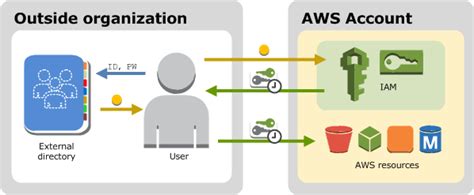
AWS managed Directory :
A best practice is to logically separate your infrastructure users and end-users. This means that, you can manage them independently and avoid overlap of process’s.
For example, if you had all your users irrespective of type in one identity store and that store had a disruption, you would not be able to effectively shut off access to specific users to debug without some work-around.
Amazon Cognito itself provides an identity store called Cognito User Pools. This would store all your users so that registration, authentication, and even password resets are handled by the user pool. Now say a user had logged into your application, and wants to upload to an S3 bucket, they require access to that bucket. This is where Cognito identity pools come in and allow authorized access to AWS resources, With Cognito, you can do that with the identity pool which means linking your Cognito user pool, would say in Open-ID connect provider, or even login with Facebook, or Google.
AWS managed Microsoft Active Directory :
This is useful if you want to reuse an existing on-premises Microsoft Active Directory without caching any information in the cloud. This means that, you can use your existing corporate credentials to log into AWS applications like Amazon workspace and even manage AWS resources like S3.
The two ways you can use it is to join your existing directory to the AWS one:
- Active Directory with your identity store and therefore not have to recreate all your users from scratch.
- You can even use single-sign-on or SSO, to ride a seamless integration between different services. SSO means that, a user would login once and then be able to access two different applications without having to log into each one individually.
Network Isolation :
AWS has placed a limited number of access points to the cloud to allow for a more comprehensive monitoring of inbound and outbound communications and network traffic.These customer access points are called endpoints. An endpoint is a URL that is the entry point for a web service.
Some services, such as IAM, do not support Regions. Therefore, their endpoints do not include a Region. If a service supports Regions, those resources in that Region are independent. For example, US-West-2 is an entry point for all AWS services in that Region. Endpoints allow secure HTTP access, or we call HTTPS, which allows you to establish a secure communication session with your resources running in AWS services.
AWS offers the Amazon Virtual Private Cloud, which provides a private network within the AWS Cloud. Amazon VPC provides not only isolation from other customers in the private cloud, it also provides Layer 3 isolation from the internet, as well. Your Amazon VPC uses IP address spaces, allocated by you. These can be used to build a private infrastructure, where networks are isolated from the internet. You can connect your on-premises environment or other VPN infrastructures to Amazon VPC using IPSec tunnels and AWS Direct Connect. And of course, you can allow resources in your VPC to talk to the internet, if you choose to do so.
Amazon Virtual Private Cloud (VPC) :
Amazon Virtual Private Cloud (Amazon VPC) lets you provision a logically isolated section of the AWS Cloud where you can launch AWS resources in a virtual network that you define. You have complete control over your virtual networking environment, including selection of your own IP address range, creation of subnets, and configuration of route tables and network gateways. You can use both IPv4 and IPv6 in your VPC for secure and easy access to resources and applications.
Network access control lists contain IPs, which are allowed or denied access to the subnet. They are also stateless, so if you allow something in, you must explicitly allow it out via a rule.
Security groups act as firewalls for associated Amazon EC2 instances, controlling both inbound and outbound traffic at the instance level.The difference being that security groups are stateful, so return traffic is automatically allowed, regardless of any rules.
More information is available at: https://aws.amazon.com/vpc/
[Image no longer available]
Q. How do you secure them further when sending traffic between VPCs ?
VPC endpoints or private links allows you to route your data through a secure endpoint in one VPC and to another. This means they do not leave your AWS infrastructure, and do not go through the Internet resulting in a safer path of travel.
Using AWS Direct Connect, you can establish private connectivity between AWS and your data center, office, or colocation environment, which in many cases can reduce your network costs, increase bandwidth throughput, and provide a more consistent network experience than Internet-based connections.
More information including pricing for AWS Direct Connect is available at: https://aws.amazon.com/directconnect/ .
A route table which contains a set of rules or routes that are used to determine where network traffic is directed. A default main route table is set up for a VPC, and you must associate a subnet with an actual route table. It doesn’t have to be the main table, and you can create a custom route table to route traffic accordingly.
Detective and Auditing :
Detective controls is a term that describes a continued improvement in monitoring of events and processing of blocks that allow for auditing, automated analysis, and alarming. Detective control are an essential part of governance frameworks and can be used to support improvement process of your security operation, a legal or compliant obligation, and for identification and response efforts. These control are important reactive factors that can help your organization identify and understand the scope of anomalous activity.
Auditing :
1.AWS CloudTrail :
It enables you to see who is doing what in your AWS infrastructure. You can track user usage of the console API calls, AWS SDKs, command line tools, and other AWS services themselves, so that you know who’s interacting with your infrastructure. The best part is that it’s enabled by default and you can view account activity for the past 90 days right in the CloudTrail console.
You can even go further and direct CloudTrail events to Amazon S3, Amazon CloudWatch Events logs, and events. This allows you to perform analysis, archive events, and even remediate on an unexpected change.
You can use CloudTrail to monitor activity related to changing an EC2 security group, and trigger an Amazon CloudWatch alarm when configuration changes happen. Also, don’t forget that you can use CloudWatch Logs to monitor, store, and access your log files from multiple sources.
Use cases :
- to collect and store application logs and server operation system logs.
- use CloudTrail to capture API activities and send to them CloudWatch Logs.
- to log Route 53 DNS queries into CloudWatch Logs.
- use CloudWatch Logs to retain and archive log data in S3.
- use CloudWatch Logs Insights to interactively search and analyze your log data
More information about AWS CloudTrail can be found at: https://aws.amazon.com/cloudtrail/ .
2.AWS Config :
This fully managed service records your AWS configuration, changes to that configuration, or a history, if you want to think about it, and even change notifications, so you’re notified proactively.
Fire up Config, and it will discover these existing AWS resources and generate a full inventory, along with all the actual configuration details, for you. You can then determine how a resource was configured at any point in time. You can even tie this into the aforementioned AWS CloudTrail, so that you gain full visibility into who made the actual change at that point in time and what the change was.
More information about AWS Config can be found at: https://aws.amazon.com/config/
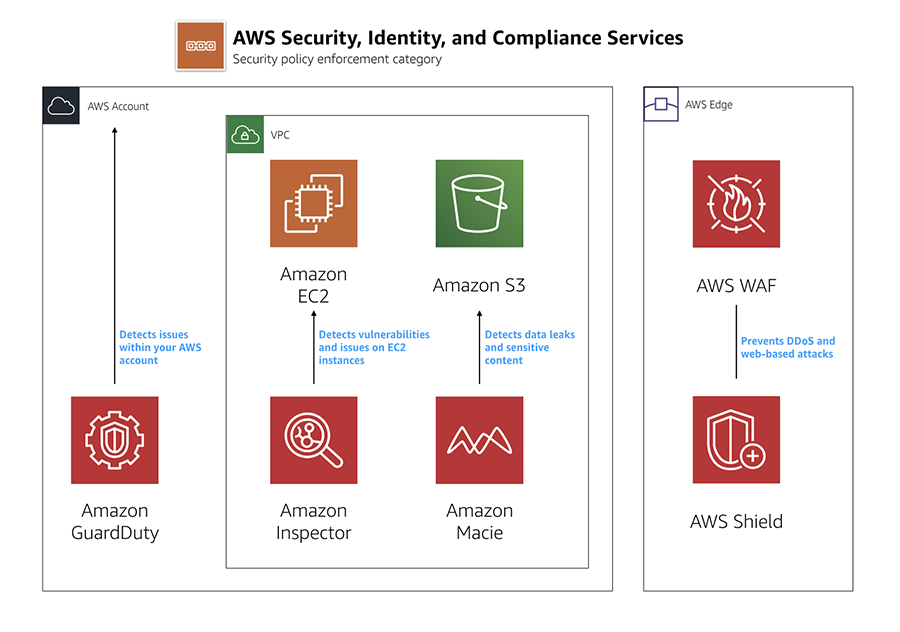
3.AWS Inspector :
This Inspector helps to improve security and compliance of your AWS deployed applications by running an automated security assessment, to check on deviations of security best practices, exposure of EC2 instances, even vulnerabilities.
The service consists of three parts –
- a network configuration reach-ability piece; It works by running an assessment based on your specific configuration choices and then outputting a list of findings for potential security issues.
- The resulting findings are displayed in the Amazon Inspector console, and they are presented with a detailed description of the security issue and a recommendation on how to fix it.
- you can retrieve findings through an API, so as to go towards the best practice of automating your remediation processes.
More information on Amazon Inspector can be found at: https://aws.amazon.com/inspector/

4.Trusted Advisor :
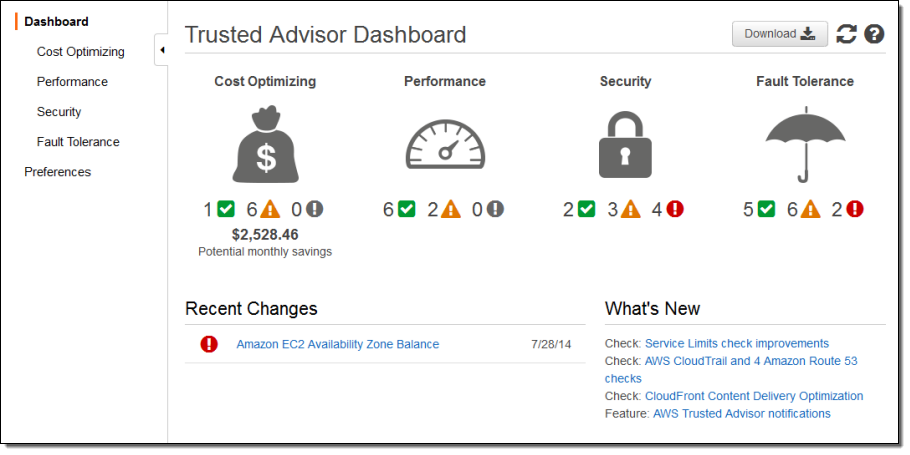
This service assists you in provisioning your AWS resources using best practices. It then produces a report under five different categories –
- cost optimization
- performance
- security
- fault tolerance
- service limits
Once you run Trusted Advisor, you will be presented with a report that you can then drill-down into. Each category will produce traffic light-based recommendations. These go in increasing severity, where green means no action recommended, orange for investigation needed, and red for action recommended
More information about AWS Trusted Advisor can be found at: https://aws.amazon.com/premiumsupport/technology/trusted-advisor/
Amazon Guard Duty :
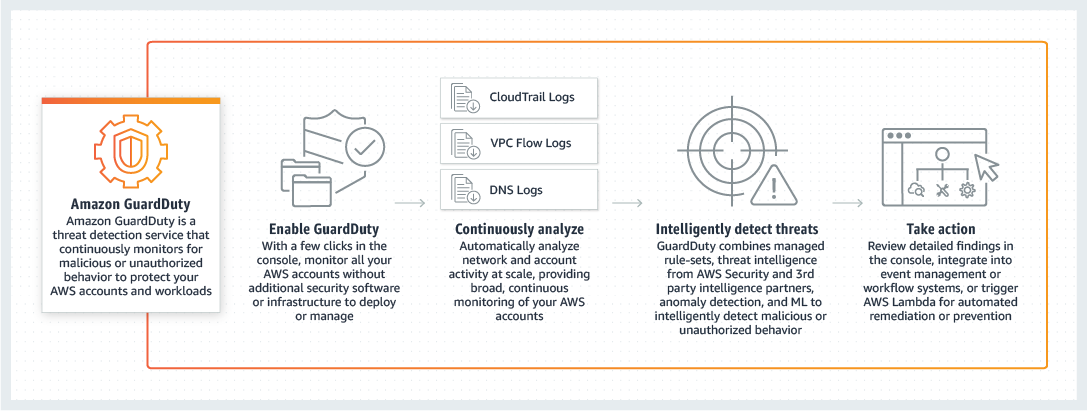
It is a threat-detection service that continuously monitors for malicious or unauthorized behavior to help you protect your AWS accounts and resources. This service uses machine learning, anomaly detection, and integrated threat intelligence to identify and prioritize potential threats.
You can aggregate Guard Duty findings across multiple accounts. You can also integrate Guard Duty with AWS CloudWatch Events or your current event management system to alert your security team, Amazon Guard Duty provides three severity levels – low, medium, and high – to help you prioritize responses to potential threats.
- A low severity level indicates suspicious or malicious activity that was blocked before it compromised your resource.
- A medium severity level indicates suspicious activity. For example, a large amount of traffic being returned to a remote host that is behind a hidden network.
- A high severity level indicates that the resource in question is compromised and is being actively used for unauthorized purposes. An example of this could be that an EC2 instance has been compromised or a set of IAM user credentials has been stolen.
Amazon Guard Duty offers HTTPS APIs, CLI tools, and Amazon CloudWatch Events to support automated security responses to security findings. You can automate the response workflow by letting Guard Duty send the findings to CloudWatch Events as an event source to trigger an AWS Lambda function to update the security group.
More information about Amazon GuardDuty can be found at: https://aws.amazon.com/guardduty/
AWS Security Hub :
With Security Hub, you now have a single place that aggregates, organizes, and prioritizes your security alerts or findings, from multiple AWS services, such as Amazon GuardDuty, Amazon Inspector, Amazon Macie, as well as from AWS partner solutions. Your findings are visually summarized on integrated dashboards with actionable graphs and tables. You can also continuously monitor your environment using automated compliance check based on the AWS best practices and industry standards that your organization follows.
More information about AWS Security Hub can be found at: https://aws.amazon.com/security-hub/
[Image no longer available]
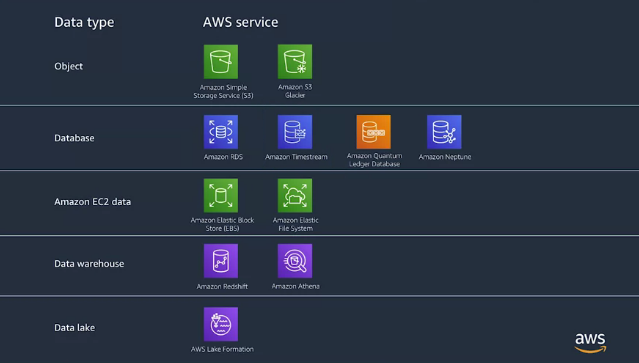
Data Storage :
We got a lot of data that an EC2 is processing, and we need somewhere to store it. We could just archive it, but that’s only if data is not needed immediately.
Q. Does data need to be accessed quickly? Or less? Does it need to be stored for days, months or years? Even what type of data you’re storing? Are you storing objects, rose, time-series data or any of the other types?
1.Amazon Simple Storage Service (Amazon S3) :
Amazon Simple Storage Service (Amazon S3) is an object storage service that offers industry-leading scalability, data availability, security, and performance. Amazon S3 provides easy-to-use management features so you can organize your data and configure finely-tuned access controls to meet your specific business, organizational, and compliance requirements. More information on Amazon S3 is available at: https://aws.amazon.com/s3/
2.Amazon S3 Glacier :
Amazon S3 Glacier is a secure, durable, and extremely low-cost cloud storage service for data archiving and long-term backup. It is designed to deliver 99.999999999% durability, and provides comprehensive security and compliance capabilities that can help meet even the most stringent regulatory requirements. More information on Amazon S3 Glacier can be found at: https://aws.amazon.com/glacier/
3.Amazon Relational Database Service (Amazon RDS) :
Amazon Relational Database Service (Amazon RDS) makes it easy to set up, operate, and scale a relational database in the cloud. It provides cost-efficient and resizable capacity while automating time-consuming administration tasks such as hardware provisioning, database setup, patching and backups.
Amazon RDS is available on several database instance types – optimized for memory, performance or I/O – and provides you with six familiar database engines to choose from, including Amazon Aurora, PostgreSQL, MySQL, MariaDB, Oracle Database, and SQL Server. You can use the AWS Database Migration Service to easily migrate or replicate your existing databases to Amazon RDS. More information on Amazon RDS can be found at: https://aws.amazon.com/rds/
4.Amazon DynamoDB :
Amazon DynamoDB is a key-value and document database that delivers single-digit millisecond performance at any scale. It’s a fully managed, multi region, multi master database with built-in security, backup and restore, and in-memory caching for internet-scale applications. DynamoDB can handle more than 10 trillion requests per day and can support peaks of more than 20 million requests per second. More information on Amazon DynamoDB can be found at: https://aws.amazon.com/dynamodb/
5.Amazon Time-stream :
Amazon Time-stream is a fast, scalable, fully managed time series database service for IOT and operational applications that makes it easy to store and analyze trillions of events per day at 1/10th the cost of relational databases. Details on Amazon Time-stream can be found at: https://aws.amazon.com/timestream/
6.Amazon Quantum Ledger Database (QLDB) :
Amazon QLDB is a fully managed ledger database that provides a transparent, immutable, and cryptographic verifiable transaction log owned by a central trusted authority. Amazon QLDB tracks each and every application data change and maintains a complete and verifiable history of changes over time.
Amazon QLDB is a new class of database that eliminates the need to engage in the complex development effort of building your own ledger-like applications. With QLDB, your data’s change history is immutable – it cannot be altered or deleted – and using cryptography, you can easily verify that there have been no unintended modifications to your application’s data. Details about Amazon QLDB can be found at: https://aws.amazon.com/qldb/
7.Amazon Elastic Block Store :
Amazon Elastic Block Store (EBS) is an easy to use, high performance block storage service designed for use with Amazon Elastic Compute Cloud (EC2) for both throughput and transaction intensive workloads at any scale. A broad range of workloads, such as relational and non-relational databases, enterprise applications, containerized applications, big data analytics engines, file systems, and media workflows are widely deployed on Amazon EBS. More information on Amazon EBS is available at: https://aws.amazon.com/ebs/
8.Amazon Elastic File System
Amazon Elastic File System (Amazon EFS) provides a simple, scalable, elastic file system for Linux-based workloads for use with AWS Cloud services and on-premises resources. Amazon EFS is well suited to support a broad spectrum of use cases from highly parallelized, scale-out workloads that require the highest possible throughput to single-threaded, latency-sensitive workloads. Use cases such as lift-and-shift enterprise applications, big data analytics, web serving and content management, application development and testing, media and entertainment workflows, database backups, and container storage. More information about Amazon EFS can be found at: https://aws.amazon.com/efs/
9.Amazon Redshift
Amazon Redshift extends data warehouse queries to your data lake, with no loading required. You can run analytic queries against petabytes of data stored locally in Redshift, and directly against exabytes of data stored in Amazon S3. It is simple to set up, automates most of your administrative tasks, and delivers fast performance at any scale. Information about Amazon Redshift is available at: https://aws.amazon.com/redshift/
10.Amazon Athena
Amazon Athena is an interactive query service that makes it easy to analyze data in Amazon S3 using standard SQL. Athena is serverless, so there is no infrastructure to manage, and you pay only for the queries that you run.
Athena is easy to use. Simply point to your data in Amazon S3, define the schema, and start querying using standard SQL. Most results are delivered within seconds.Details about Amazon Athena can be found at: https://aws.amazon.com/athena/
Data Transfer :
1.AWS Snowball :
Snowball is a petabyte-scale data transport solution that uses devices designed to be secure to transfer large amounts of data into and out of the AWS Cloud. Snowball devices use tamper-resistant enclosures, 256-bit encryption, and an industry-standard Trusted Platform Module (TPM) designed to ensure both security and full chain-of-custody for your data. More information about AWS Snowball can be found at: https://aws.amazon.com/snowball/
2.AWS Snowmobile :
AWS Snowmobile is an Exabyte-scale data transfer service used to move extremely large amounts of data to AWS. You can transfer up to 100PB per Snowmobile, a 45-foot long ruggedized shipping container, pulled by a semi-trailer truck. Snowmobile makes it easy to move massive volumes of data to the cloud, including video libraries, image repositories, or even a complete data center migration. Transferring data with Snowmobile is more secure, fast and cost effective. Information about how to get started with AWS Snowmobile can be found at: https://aws.amazon.com/snowmobile/
Encryption and Security :
1.Encryption in Transit :
Handling customer data without thinking ahead on how to secure it can impact credibility of your organization and your company
- Define requirements for data protection in transit. Based on legal and compliant requirements, you classify data into multiple categories which is dependent on sensitivity level of the data.
- Then you apply encryption standards to the right category. For example, historical weather data is consider public data. So you don’t have to require encryption in transit when working with this data. However, customer credit card information is highly confidential data, thus you want to make sure is encrypted in transit.
- You also need to authenticate network communications. So that includes verifying the identity of communications by using protocol such as Transport Layer Security (TLS) or using IPSec.
- IPSec can be implemented when you set up virtual private network or VP N to create a secure connection between your VPC and on-premises Network.
- Transport Layer Security or TLS is a set of industry standard cryptographic protocols used for encrypting information at the transport layer which is layer four of the OSI model.
- Both SSL and TLS negotiate a symmetric key between the client and a server that are used to encrypt data flowing between two entities.
- You should use HTTPS instead of HTTP for data transmission. HTTPs use SSL, TLS protocol to prevent eavesdropping, unauthorized alterations, and unauthorized copying of your data.
Internet Protocol Security or IPSec is a protocol for intrinsic data protection between host. It is a protocol to protect communication at the network layer which is layer three of the OS I model.
All AWS services provide API endpoints that allow you to establish secure HTTPS communication sessions. For your web application, you can choose to terminate the encryption at the application layer or at the load balancer layer. You want to make sure you store X.509 certificates securely and rotate them with strict access control. Amazon Certificate Manager (ACM) handles the complexity of creating and managing public SSL and TSL certificate for your website and applications. You can use public certificates provided by ACM called ACM certificates or certificate that you import into ACM.
2.Encryption at Rest :
There are two services we’re going to touch on here. Think about your key? Do you want to manage it, or do you want to AWS to manage it? Do you want it to also be created by AWS, so that you can let us do the heavy lifting of generating new keys on a fixed schedule?
These kinds of questions lead us to Amazon key management service or KMS, which will allow you to easily manage the encryption keys used to encrypt your data. The primary resource here is called a customer master key and you use that to encrypt and decrypt up to four kilobytes of data.
- These CMKs can be managed by you, which will give you full control of them. You manage everything from rotation to deletion, IAM policies, and so forth.
- AWS managed and these are created, managed, and used on your behalf by an AWS service that integrates with KMS
- Both of these types live in your AWS account, whereas the third type called AWS owned lives outside your AWS account. Think of them as part of a collection of CMKs that AWS owns and manages for use in multiple AWS accounts.
Q. What if your company wants you to manage these keys using dedicated hardware?
AWS CloudHSM is a cloud-based hardware security module (HSM) that enables you to easily generate and use your own encryption keys on the AWS Cloud. With CloudHSM, you can manage your own encryption keys using FIPS 140-2 Level 3 validated HSMs. CloudHSM offers you the flexibility to integrate with your applications using industry-standard APIs, such as PKCS#11, Java Cryptography Extensions (JCE), and Microsoft CryptoNG (CNG) libraries.
[Image no longer available]
3.Database encryption :
You can use SSL from your application to encrypt a connection to an RDS DB Instance running Amazon Aurora, MySQL, MariaDB, SQL Server, Oracle or Postgres. Each DB engine has it own process of implementing SSL.
In case you are wondering, Amazon Aurora is a relational database service which features are distributed fault tolerant, self-healing storage system that can auto scale up to 64 terabytes per database instance. The best part is, it is compatible with MySQL and Postgres database engines. You can encrypt your Amazon RDS, DB Instance and snapshot addressed by enabling the encryption option when you create Amazon RDS DB Instance. RDS encrypted DB Instance use the industry standards AES-256 encryption algorithm to encrypt your data on the server that hosts your DB Instance.
Amazon DynamoDB encrypts all user data, store in DynamoDB table by default. Server side encryption at rest is enabled for all DynamoDB table data and can not be disabled. When a table is encrypted, all the data includes as primary key, index, stream, Global table, backups will be encrypted.
Encryption at rest integrate with AWS KMS for managing the encryption key that is used to encrypt your tables and you can switch between keys.
1.S3 :
Recommendations for S3 Storage Bucket .
- only allowing bucket access to authorized parties.
- if you don’t need public access, make sure it’s disabled for a bucket.
- maybe you want to add encryption to the equation.
A bucket policy is a resource-based AWS Identity and Access Management policy, which means that you designate access permissions for the bucket and the objects in it. It is recommend to enable default encryption on the bucket itself. This means that all objects in that bucket will be encrypted, and that encryption can be centrally managed at the bucket level. Objects will be encrypted using server-side encryption with either Amazon S3 managed keys, that’s SSE-S3, or AWS KMS, or Key Management Service managed keys, SSE-KMS.
When you use server-side encryption, Amazon S3 encrypts an object before saving it to disk in its data centers and decrypts it when you download the objects. More details on using Encryption with Amazon S3 can be found at: https://docs.aws.amazon.com/AmazonS3/latest/dev/bucket-encryption.html
4.Amazon Macie :
That means Amazon Macie will automatically recognize your sensitive data, such as personally identifiable information, or PII, even intellectual property, your IP, You’ll then be provided with alerts on areas of interest, along with a dashboard giving you insights into how your data is being accessed, moved, and modified.
Some of the things that Macie checks for are
- inadvertent exposure of data, insider threats, and targeted attacks.
- You can then alert on suspicious activity, such as compromised user accounts and downloading of large amounts of sensitive content from unusual IP addresses,
- maybe the download of a large quantity of source code by a user account that typically does not access this type of sensitive content.
The fully managed service continuously monitors data access activity for anomalies, and generates detailed alerts when it detects risk of unauthorized access or inadvertent data leaks. Currently, Amazon Macie is available to protect data stored in Amazon S3. More information about Amazon Macie is available at: https://aws.amazon.com/macie/
5.EBS Encryption :
EBS provides persistent block storage volume for use with Amazon EC2 instance in the AWS cloud. When you need to encrypt data in an EBS volume, the solution is straight forward. You can configure your AWS account to enforce the encryption of new EBS volume and snapshots. That means, new EBS volume will be automatically encrypted when you create them. EBS provides our features to backup data in EBS volume to ash tree by taking point-in-time snapshots.
When you create encryption by default, these snapshots will be encrypted as well. EBS volume encryption doesn’t require you to build, maintain, and secure your old key management infrastructure. Instead, they AWS key management service or KMS when creating encrypted volumes as snapshot.
For assisting UN-encrypted EBS volume, you can create snapshots for the volumes, and create new encrypted EBS volume from this snapshot using “Create Volume” or “Copy Snapshot” API action. When you create an encrypted EBS volume and attach it to a supported instant type, the following type data are encrypted.
- course data address inside the volume.
- all data are moving between the volume and the instant will be encrypted.
- all the snapshot created from the volume will be encrypted as well.
- all the volume created from those snapshot also encrypted.
Encryption operation occur on the servers that host EC2 instance, ensuring the security of both data address and data in transit between an instant and it’s attach EBS storage. Amazon EBS encryption is available only on certain instant types. You can attach both encrypted and unencrypted volumes to a supported instance type.
[Image no longer available]
Protection :
1.Compute resource :
AWS will be responsible for protecting the hypervisor and EC2 instance isolation. To secure your EC2 instances, there are several best practices that we recommend.
-
restrict access at the network and the OS layer.
-
you can leverage security groups as the primary mechanism for controlling network access to EC2 network interfaces.
-
you can use network ACLs as a secondary control for denying a specific subnet of traffic, all providing high-level subnet guardrails.
-
on the instance itself, you should only install necessary packages for your operating system and applications.
-
it is also recommended that the SSH key be used to log in to the EC2 instances need to be secured, and providing interactive access to EC2 instances should follow the least privileges model.
-
controlling the API access coming from EC2 instances is important. When your applications run on EC2 instances need to access our AWS services, you should use IAM roles to grant permissions for the instance to make API calls.
-
using IAM roles eliminates the need to distribute and rotate long-term credentials on EC2 instances.
-
we recommend to regularly scan and install missing patches for your instances. This is where AWS Systems Manager can help you to automate processes around patching Windows and Linux EC2 instances.
-
apply security monitoring and auditing for EC2 resources and your accounts.
- This will include enabling AWS CloudTrail, to capture API calls, which will enable AWS Config to audit and track changes made to your EC2 resources.
- Now, if you choose to run your application in Docker containers, there are several container management and orchestration services available. You’ll maintain control over the container environment, the operating system, and the underlying EC2 instance when using Amazon ECS and EKS. However, you have control over the container environment.
- ECS, EKS, and Fargate let you use IAM roles to control requests from the application running on containers to other AWS services.
-
For more information on securing EC2 instances please see: https://aws.amazon.com/answers/security/aws-securing-ec2-instances/
-
This white paper provides an overview of security when using Lambda: https://d1.awsstatic.com/whitepapers/Overview-AWS-Lambda-Security.pdf
-
More details on Amazon ECS can be found at: https://aws.amazon.com/ecs/features/
2.AWS Lambda :
AWS Lambda automatically runs your code without requiring you to provision or manage servers. You just write the code and upload it to Lambda. AWS will manage the underlying infrastructure and foundation services, the operating system, and the application platform for Lambda. You are responsible for the security of your code, the storage and accessibility of sensitive data, and IAM to the Lambda service and within your function.
Each Lambda function runs in one or more dedicated execution environments that are used for the lifetime of the function, and then it will be destroyed. So, you can use CloudWatch and CloudTrail to monitor and audit your Lambda functions, and you can also track configuration changes to allow the function using AWS Config.
3.Protecting the Endpoints :
Elastic Load Balancing works with Amazon Virtual Private Cloud (VPC) to provide robust security features, including integrated certificate management, user-authentication, and SSL/TLS decryption. Together, they give you the flexibility to centrally manage TLS settings and offload CPU intensive workloads from your applications. For more information on ELB, see https://aws.amazon.com/elasticloadbalancing/
There are a few different types with the two notable ones being the Application Load Balancer, or ALB, and Network Load Balancer, or NLB. The ALB operates on the individual request level, or Layer 7, and the Network Load Balancer operates on the connection level, or Layer 4.
In our example, we’re using the NLB, and we’re load balancing traffic across our fleet, using a round-robin algorithm, which rotates traffic in order between the instances. Our fleet hosts a website, and since we want to secure it by default, we require that the traffic is always transported over HTTPS. HTTPS, and it means that requests will be encrypted and decrypted. In order to achieve this on our EC2 instances, we route the encrypted traffic through the NLB and then terminate them on the instances themselves. Requests will then be decrypted on the instances, and the application can proceed further.
Additional information about TLS termination for Network Load balancers is available in this AWS Blog posting: https://aws.amazon.com/blogs/aws/new-tls-termination-for-network-load-balancers/
Improvised Solution :
By using the NLB, we can terminate our HTTPS traffic on the load balancer itself, which will free your EC2 servers from the compute-intensive work of encrypting and decrypting all of your traffic. You also get some added benefits, like simplified management, access logs, and improved compliance.
4.API Gateway :
API Gateway, where API stands for application programming interface. It’s a fully managed service, which allows you to create, publish, maintain, monitor, and secure APIs at any scale. By using API Gateway, you can expose certain application logic via REST or even WebSockets.
In essence, you’re only allowing access to needed parts of your application, and therefore, you’re not opening, say, your backend for the whole world. This notion of protecting your backend, and other critical systems, such as your database, is a best practice for any architecture, and we highly recommend it when designing your next workload.
Q. How do we make sure only authorized users can use it?
You can add optional authorization processing, such as AWS Signature Version 4, or SigV4, even Lambda authorizers. SigV4 works via AWS credentials. These being your access and secret keys, which authorize access by signing those requests to your service. When you create your API Gateway service call structure, you essentially generate a custom SDK for your service, and this custom SDK will handle the signing for your requests. If you don’t want to use permanent credentials, you can even use Amazon Cognito to retrieve temporary, role-based ones, so you can make calls to your API. The other option for securing your API Gateway is via custom Lambda authorizers, which are actually AWS Lambda functions. And as a reminder, Lambda functions are the serverless compute offering on AWS, and allow you to write your code as reasonable functions, in a language of your choice.
This means that if a Lambda authorizes is configured, API Gateway calls the Lambda function with the incoming authorization token, and depending on the strategy you implemented, it will return IAM policies, which are used to authorize the request. If the policy returned by the authorizer is valid, API Gateway will then cache the policy associated with the incoming token for up to 1 hour. And, that’s how you can secure your API Gateway.
5.AWS Shield :
AWS Shield is a managed Distributed Denial of Service (DDoS) protection service that safeguards applications running on AWS. AWS Shield provides always-on detection and automatic inline mitigations that minimize application downtime and latency, so there is no need to engage AWS Support to benefit from DDoS protection. There are two tiers of AWS Shield – Standard and Advanced.
6.AWS WAF :
AWS WAF is a web application firewall that helps protect your web applications from common web exploits that could affect application availability, compromise security, or consume excessive resources. AWS WAF gives you control over which traffic to allow or block to your web applications by defining customizable web security rules.Also, AWS WAF includes a full-featured API that you can use to automate the creation, deployment, and maintenance of web security rules.
Secrets Manager :
These database credentials can be defined as a type of secret. They need to be carefully stored and handled. Other secret types can be password, third-party API key, and even arbitrary text. Handling of these secrets can be an important task in any infrastructure that requires secure handling and protection from unauthorized access. . You also want to rotate your secret frequently to avoid things like stale credentials from being used against you. And keep in mind that your secret will need to be encrypted at rest and in transit. A best practice is never to log the secret in system logs or application logs.
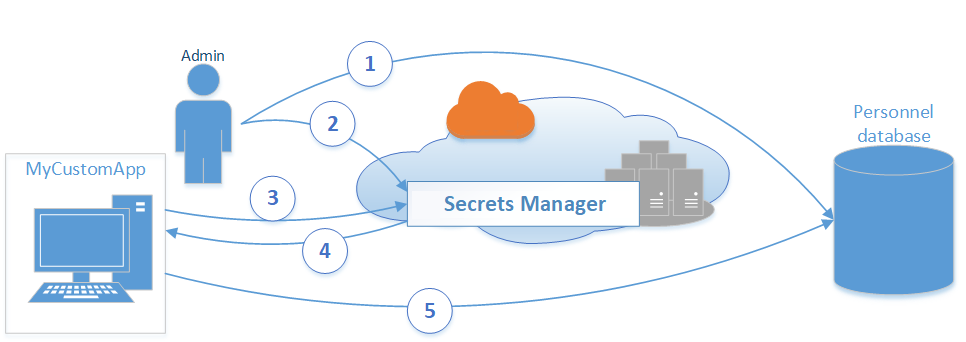
AWS Secrets Manager is an AWS service that makes it easier for you to manage secrets. In short, it gives you the ability to have a centralized storage for the secrets and provide direct access to only the necessary components. So, the way that Secrets Manager works is,
- an admin creates or retrieves the secret. In this example, the secrets are database credentials.
- the admin then stores the credentials in Secrets Manager and limits access to only the necessary users. Here, the user is a custom application running locally.
- the application makes a call to Secrets Manager using its credentials that it has from the associated IAM role.
- because the admin allowed for the application to have access, the application is then allowed to retrieve the credentials
- Once the credentials are retrieved, they are stored in a non-persistent way, and then the credentials can be used to access the database, as we see with step number five.
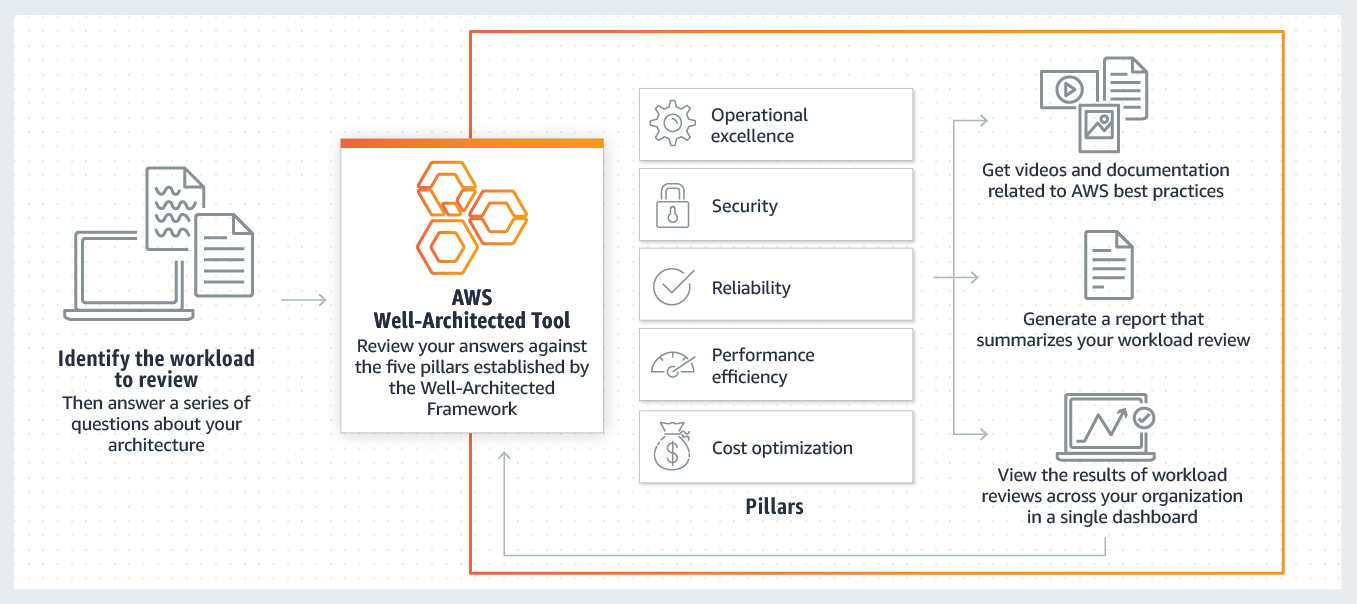
well architected framework :
It’s composed of five pillars to ensure a consistent approach to reviewing of architectures and designing for scaling over time,
- It’s cost optimization,
- operational excellence,
- reliability,
- performance efficiency,
- security.
You can now access it via the AWS console, create a workload, and run it against your AWS account to generate a report showing areas that should be addressed. It’s similar to the traffic light system with AWS Inspector, with green being, everything is okay .Orange being, there is room for improvement and red being, there is a critical error that must be taken care of .
previous blog in the series :https://programmerprodigy.code.blog/2020/05/31/aws-fundamentals-awscloud/
next blog in the series :https://programmerprodigy.code.blog/2020/06/05/aws-fundamentals-migrating-to-the-cloud/