AWS Fundamentals: Migrating to the Cloud
Hi, so this is part 3 in AWS Fundamentals part. This time we will be focusing on migrating to the AWS Cloud, all the information has been learned from this course, https://www.coursera.org/learn/aws-fundamentals-cloud-migration/home/welcome and AWS docs.
Q.What is Migration ?
Cloud migration is the process of moving data, applications, or other business elements to a cloud computing environment. Whether it is a server you want to retire, some data you want to move, or an entire networked environment that needs a new home, there are various types of cloud migrations an enterprise can perform.
For many companies, the number one reason they choose to move to the cloud, is the agility and speed that they can move with. The migration process involves five phases.
1.Phase one, migration preparation and business planning ;
It starts with some foundational experience and developing a preliminary business case for migration, which requires taking objectives into account, along with the age and architecture of the existing applications and their constraints.
2.Phase two, portfolio discovery and planning :
The goal is to establish where our dependencies are between our applications, and begin thinking about what types of migrations might work best for each. Not every application is likely to fall into the same migration strategy. The AWS application discovery service can assist with this process by gathering information about your environment.
3.Phases three and four, designing, migrating, and validating applications :
With phases three and four, we’re still planning with our designs, but we then migrate and validate. Here the focus starts to shift from the portfolio level to the individual application level, where you’re designing, migrating, and validating each application.
Applications need to be looked at individually. Their needs require assessment, and then they need to be treated in the ways that best fit their use cases. This is not the time to try and force a one size fits all type of mentality.
Partners can help you here as well as AWS server Migration Service, AWS database Migration Service, and Cloud Endure Migration.
4.Phase five, operate:
Phase five is an ongoing phase, taking all of the information and lessons learned from our migration and working towards continual improvement. There are many migration partners available to help you better operate in the cloud and become more proficient in your migrations
[Image no longer available]
Cloud Adoption Framework :
AWS Professional Services created the Cloud Adoption Framework to help organizations design and travel an accelerated path to successful cloud adoption. The guidance and best practices provided by the framework help you build a comprehensive approach to cloud computing across your organization, and throughout your IT lifecycle. The Cloud Adoption Framework covers what we see as six important perspectives to consider when looking at cloud adoption plans.
The business perspectives look at business, people and governance. While the technical perspectives focus on platform, security, and operations.
The business perspective,
- to help you move from separate strategies for business and IT, to a business model that integrates IT strategy.
- the people perspective focuses on preparing teams for cloud adoption, by updating staff skill, and organizational processes, to include cloud based competencies.
- the governance is about the integration of IT governance, and organizational governance. It provides guidance on identifying and implementing best practices for IT governance, and on supporting business processes with technology.
On the technical side,
- the platform perspective helps you design, implement, and optimize the architecture of AWS technology, based on business goals and objectives, by helping to provide strategic guidance for the design, principles, tools, and policies you use to define AWS infrastructure.
- the security perspective helps you to structure the selection and implementation of controls.
- the operations perspective helps you to run, use, operate, and recover IT workloads, to levels that meet the requirements of your business.
Amazon has six approaches that we see as common migration strategies for applications. The six strategies are. Rehost, replatform, repurchase, refactor, retire and retain.
You should gain a thorough understanding of which migration strategy will be best suited for certain portions of you portfolio. It is also important to consider that, while one of these six strategies may be best for migrating certain applications, another strategy might work better for moving different applications in the same portfolio.
1.Rehost :
Rehost commonly referred to as lift and shift, is a direct migration where you’re trying to pick up and move your applications or environments directly into the cloud, while trying to make as few changes as possible. . With re hosting, your goal is often just to try and get to the cloud as quickly as possible, while maintaining the stability functionality and security of your existing system.
2.Replatforming :
Replatforming is about gaining some optimization while migrating. So instead of a lift and shift restriction, we’re looking more at lift, tinker, and shift. Overall, this wouldn’t look too different. You’re still trying to maintain the stability and functionality, but you may also want to find some ways that will immediately make things easier in the long run. Maybe not major changes, but something simple to handle. For example, your database.
3.Repurchase :
In the repurchase strategy, you’re making the decision to move to a different product or licensing model. An example of this strategy could be to use the migration as an opportunity to upgrade to a newer version of a product, or maybe to move from a commercial license to an enterprise license, or vice versa. The important distinction is that you aren’t fundamentally changing the design of the application or system.
4.Refactor :
For the refactor or rearchitect strategy, you’re typically driven by a strong business need to add features, scale, or performance that would be difficult to achieve in the existing environment. Even though this strategy can sometimes be the most expensive when calculating hours spent, it can often yield the best results, since it allows for taking full advantage of the benefits that the cloud offers.
5.Retire :
Retire strategy can be implemented to help clean up and reduce the assets to be migrated. By removing the applications no longer in use, it allows you to direct your attention towards migrating and maintaining the resources that matter.
6.Retain
The final strategy is to retain things as is. This decision can be made for a variety of reasons. Sometimes there are applications that you are just not ready to migrate. Or, in some cases, the business feels more comfortable keeping them on premises.
There is no one-size-fits-all approach to migrations, so taking the time upfront to plan will lead to the least headaches and most success.
[Image no longer available: Phases of the cloud migration process]
For further information,
- https://aws.amazon.com/blogs/enterprise-strategy/6-strategies-for-migrating-applications-to-the-cloud/
- https://aws.amazon.com/cloud-migration/how-to-migrate/
Scaling :
While scaling is a great and wonderful thing, there are some things that need to be considered. Depending on your application, there are all sorts of things that may change how you’re scaling.
1.Scaling Constraints :
Not everything can scale in the same way. If you have a limited number of licenses, and getting more requires a lot of time, approval, or just a lot of processes to work through, dynamically scaling can be very difficult. Or perhaps your application just can’t support the downtime it would take to change the underlying architecture so that it can handle more of a workload.
Architecting in such a way so that you don’t have to dynamically scale would be the way to go. Looking at adding other components to help when you can’t scale would be a good way to design around this. Resources like managed caches and queues help to not lose requests when scaling is limited. Also, offloading unnecessary work from UN-scalable servers could help.
what if you have resources that technically can scale but you don’t wanna lose session data in the process?
2.Session data management :
If your application has session data that you’re trying to maintain but also need to scale to adjust the changes in demand, the easiest thing to do is just store your session data off the instance, using off-server session storage can really help provide scaling in what could otherwise be a very constrained environment. Using data stores like caches can really help to maintain functionality while not limiting your scaling capabilities.
3.major scaling methodologies :
3.1.Horizontal scaling :
Horizontal scaling or scaling out is when we add more resources and distribute across them. The benefit of this is it incurs no downtime for your original resource. As the load continues to grow, we can continue to add more and more resources, and spread the load across them. Once your load subsides and we need less resources, we can scale back in to the original number. This is done with little to no impact to your end user.
3.2.Vertical Scaling :
With vertical scaling, you maintain the same logical resource but you’re making that resource more capable. Adding things like memory, storage, or compute power so that that resource can handle more of a workload. With this type of scaling, you don’t have to distribute requests across multiple, because you do still have that one same logical resource. But there are some limitations.
- there typically is some downtime when you are vertically scaling.
- while you’re scaling, you typically scale up but I guess you don’t scale back down.
[Image no longer available]
Q.What is High availability ?
It’s building in such a way that allows for increased uptime, or availability. Designing for the highest levels of availability is always a good practice, and moving into a cloud environment like AWS makes this easier than trying to achieve the same levels of availability in a traditional environment.
A primary principle here is to avoid single points of failure. If the failure of any single component or node would cause a negative impact to the system as a whole, look for ways to minimize the impact.
- In some cases, this could mean running more than one instance of a component, and in other situations, it could mean having a replacement that can easily be launched should the primary fail.
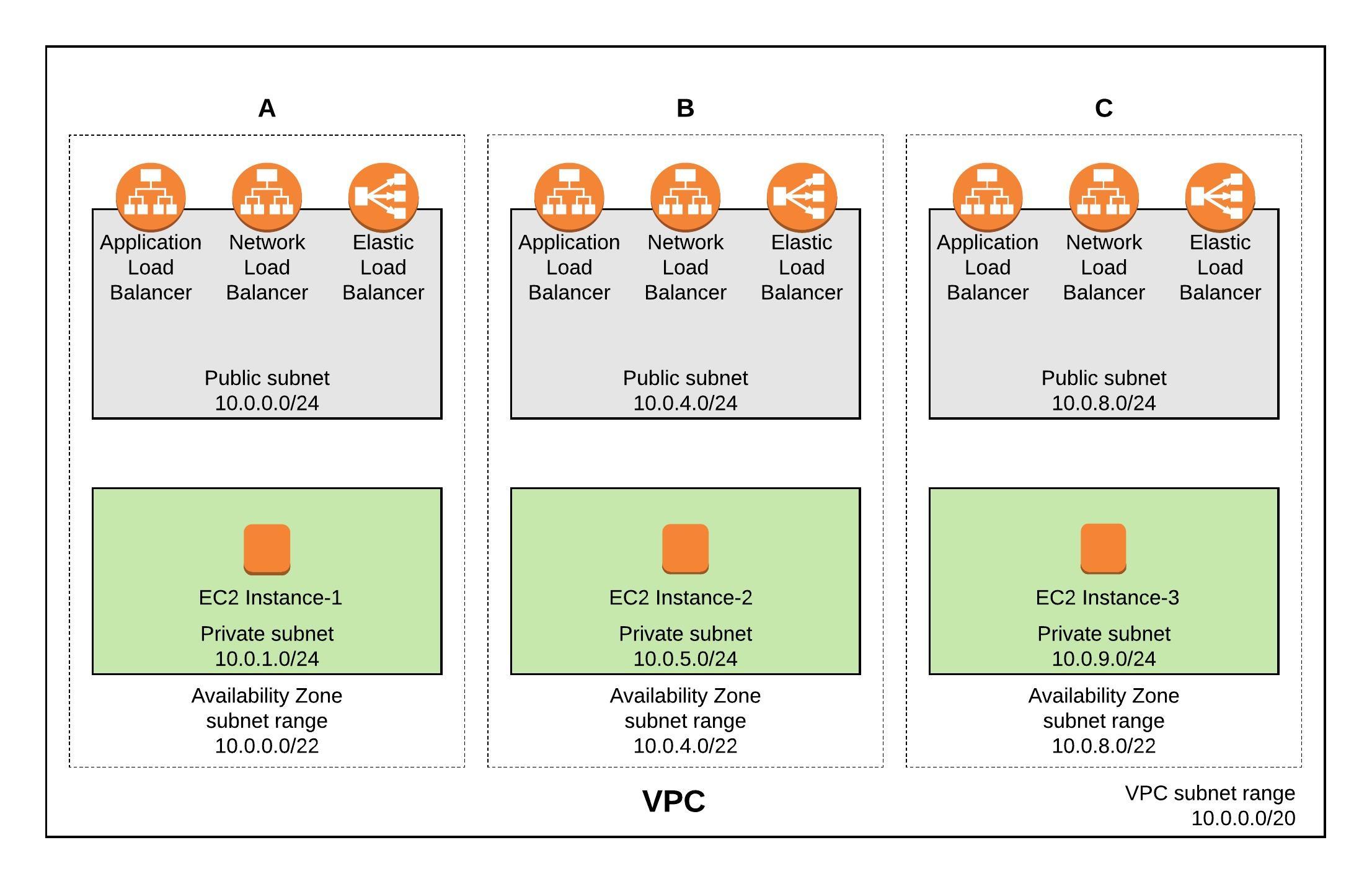
- Another way to help build towards higher availability is to utilize ways to distribute traffic and requests across multiple endpoints or nodes. Using load balancers is a major way this can be accomplished.
- To monitor your environments. Monitoring can help you identify expected trends, trigger actions for anything outside of normal behavior, and help you to automate recovery of anything that might fail within your environment.
Considerations with Migrating DB vs Applications
When migrating applications, much of the time and energy goes into ensuring consistent or maybe even improved performance. Planning and preparation is put into being ready when the switch finally happens and there is rarely any middle phase to worry about between environments.
With your data, because this is often one of the most crucial components of your application’s environment, there may still be access requirements before, during, and after the migration. This is a one of the reasons that database and datastore migration is so important to consider and plan when handling the migration.
- It is likely that many questions about your database will be well-known before your migration is even a discussion. Things like the size, schema, types of tables and engine specific limitations are usually topics that are regularly discussed and reviewed.
- Next, you’ll want to understand your requirements. The requirements of your database for normal operation while migrating and in your new environment will all need to be analyzed.
- Are you replacing anything about the platform of your database? Do you know all the key parameters of your new environment? Can your app afford downtime and how long can this downtime be? How much of the data needs to be migrated now versus later?,
- You will need to know the limitations of your network, how much of your bandwidth is available for you to use, how much of your network utilization can your database handle in both your source and destination locations. Keep in mind that during the migration, you may be placing additional load on the database. How much of an additional load and for how long is going to depend on the migration methods.
- Another area to look into is planning your talent. Someone needs to know the source and destination database engines which can be multiple people if any changes are being made. Somebody needs to know about servers, ports, and firewall rules, and how to handle the network requirements from a practical operations perspective as opposed to just theoretical. So planning and gathering who is going to be involved becomes very important.
- The last item I want to cover is planning your time. Database migration projects often include refactoring of the application and database code, and also the schema. All of this is a time-consuming and iterative process. The refactoring process alone can take anywhere from a few weeks to several months depending on the complexity of your application and database.
These are just some of the areas for you to focus on when looking at how database migration differs from direct application migration.
AWS Sever management Service (SMS) :
AWS Server Migration Service (SMS)specifically meant to enable an easier transfer of your virtual resources directly into your AWS cloud environment. SMS is an agentless service, which makes it easier and faster for you to migrate up to thousands of on-premise workloads to AWS.
The service allows you to automate, schedule and track incremental replications of live server volumes and makes it easier for you to coordinate small and large scale server migrations
There are some requirements that you need to be aware of when using the service.
- The main requirement is that AWS SMS is currently only available if you are migrating VMware vSphere, Microsoft Hyper-V, and Azure virtual machines into the AWS cloud. Keep an eye out for any updates to the supported source environments by checking the AWS Server Migration Service documentation.
- Another requirement for you to be aware of is that SMS replicates your server VMs as cloud-hosted Amazon Machine Images that can be deployed on EC2.
- This does not move VMs into functions or any other area of AWS but it does allow for you to launch your server VMs as Amazon EC2 instances.
- The last requirement is that if you want to use SMS to help you transfer server VMs from your origin environment into AWS, you must use a connector.
- The server migration connector is a free BSDVM that you install in your on-premise virtualization environment. The connector aids in the creation of appropriate permissions and network connections that allow SMS to execute tasks in your virtualized environments
- Testing is also simple to automate because the migrations create EC2 AMIs which can easily be launched and tested for verification of successful migrations.
- Monitoring of your migrations is made possible by Amazon CloudWatch and logging and auditing can be done through AWS CloudTrail.
VM Import and VM on AWS (Server Migration Service) :
VM import/export enables you to easily import virtual machine images from your existing environment to AWS, as Amazon EC2 instances or Amazon Machine Images, AMIs. This enables you to migrate applications and work loads to Amazon EC2, copy your VM image catalog to EC2, or create a repository of VM images for backup and disastor recovery.
For most VM import needs we recommend that you use the AWS Server Migration Service, since it automates the import process. It can simplify the process overall. Requiring just a few clicks in the AWS management console once everything is set up.
AWS Migration Hub :
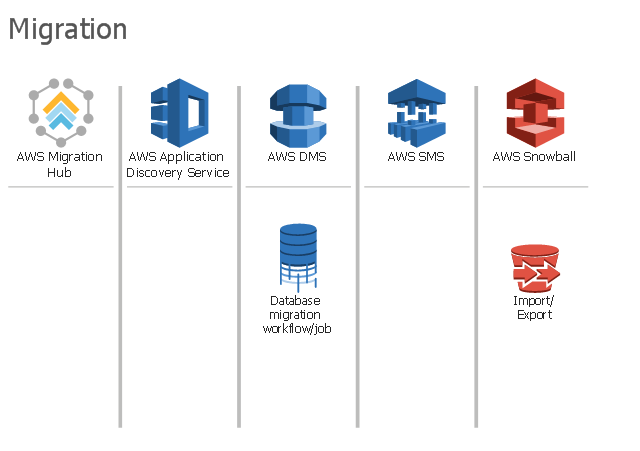
Using Migration Hub allows you to choose the AWS and partner migration tools that best fit your needs while providing visibility into the status of migrations across your portfolio of applications.This allows you to quickly get progress from updates across all of your migrations, easily identify and troubleshoot any issues, and reduce the overall time and effort spent on your migration projects while providing a single place to monitor migrations in any AWS region where you migration tools are available.
In order to view your assets in Migration Hub, you perform discovery using an AWS discovery tool or by migrating with an integrated migration tool. Once you’ve performed discovery or started migrating, you can explore your environment from within Migration Hub. When the migration completes, Migration Hub also shows details about the resources that have been created by the migration.
- For servers migrated by AWS Server Migration Service, CloudEndure Migration, and other migration services and partners, Migration Hub provides links to the AMIs created or running Amazon EC2 Instances.
- For databases migrated by AWS Database Migration Service, Migration Hub provides the target endpoint ID which can be used as a search filter on the Database Migration Service Management Console.
AWS Application Discovery :
[Image no longer available]
The AWS Application Discovery Service helps you to plan your migration to the AWS cloud by collecting usage and configuration data about your on-premises servers. Application Discovery Service offers two ways of performing discovery and collecting data about your on-premises servers;
1.Agentless discovery :
Agentless discovery works with VMware vCenter, and can be performed by deploying the AWS Agentless Discovery Virtual Appliance. After the discovery connector is configured it identifies virtual machines and hosts associated with vCenter. The discovery connector collects configuration information about your servers, like server host names, IP addresses, Mac addresses, and disc resource allocations, also collects metrics about the VMs. It can inform decisions like what type and size of EC2 instance to use.
Discovery connector cannot look inside each of the VMs, so it cannot figure out what processes are running on each VM, or what network connections exist. If you need insights into that type of information, then using an agent-based approach will be required.
2.Agent-based discovery :
Agent-based discovery can be performed by deploying the AWS Application Discovery Agent on each of your VMs and physical servers. The agent will then collect static configuration data, similar to the discovery connector. In addition to those static config details, the agent will record detailed time series systems performance information, inbound and outbound network connections, and processes that are running.
You can export this data to perform an analysis and to identify network connections between servers for grouping servers as applications. The Application Discovery Service is integrated with our AWS Migration Hub, which helps to create a single pane of glass view into migration progress.
All of the data that is collected by the Application Discovery Service can be exported for analysis using tools like Amazon Athena and Amazon QuickSight.
[Image no longer available]
Data Considerations When Migrating :
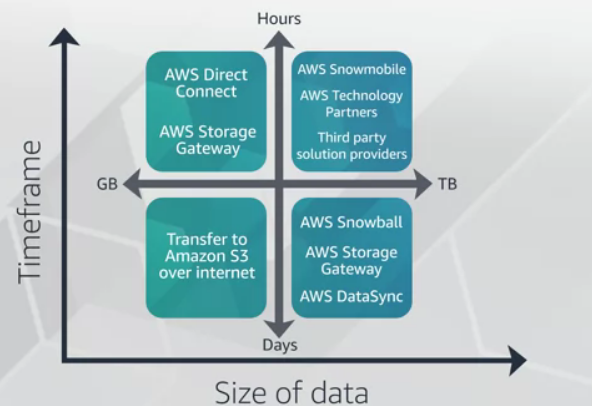
The tools for migrating data to the AWS Cloud are either unmanaged or AWS-managed. Some options for data migration, depending on the volume of data and the velocity of migration.
Unmanaged migration tools are the easy, one-and-done methods to move data at small scales from your site into Amazon cloud storage. These include options like rsync or the Amazon S3 and Amazon S3 Glacier command line interfaces.
AWS-managed migration tools help you manage the data migration tasks more efficiently and can be further classified into two broad categories: tools that optimize or replace the internet, like direct connect, and tools that provide a friendly interface to Amazon S3. If you have large archives of data or data lakes or in a situation where bandwidth and data volumes are simply too large, you might want to lift and shift the data from its current location straight into AWS. You can do this either by using dedicated network connections to accelerate network transfers or by physically transferring the data using AWS Snowball
Storage options while migrating :
1.Amazon EFS, Amazon EBS, & Amazon S3 :
So while you’re planning out your migration, be thinking about what the best storage option for your various workloads might be. Test and experiment with them and find out what provides the most optimal performance to meet your needs.
1.1.Amazon Elastic Block Store or EBS :
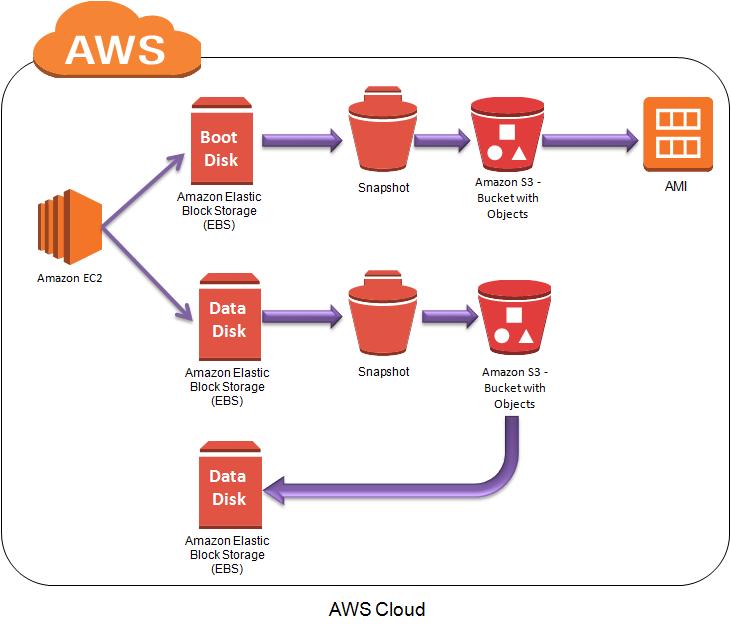
This provides block level storage volumes for use specifically with EC2 instances. EBS volumes behave like raw, unformatted block devices that you can mount as devices to your instances. And while you can mount multiple volumes on the same instance, each volume can only be attached to one instance at a time. Within EBS there are several configurations open to you and the volume types that you can choose include both SSD and traditional HDD options.
The general purpose volume is the most common type and the default volume used by Amazon EC2.
- General purpose SSD volumes provide strong levels of performance for a wide variety of workloads. You also have the ability to adjust the level of performance you may require. These are best utilized when you need consistent and high levels of performance.
- For our HDD volumes we have another two options for you to consider.
- For the throughput optimized volumes, these are for frequently accessed throughput intensive workloads. While it’s not the fastest type of storage in EBS, it is a great balance of cost and functionality.
- cold HDD volume. These are going to be best suited for scenarios where the lowest cost block storage is of utmost importance. The major difference between throughput optimized and cold HDD is unsurprisingly enough, the throughput.
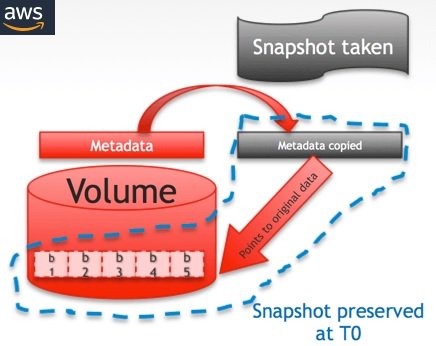
1.2.Amazon Elastic File System.
Elastic File System, also known as EFS allows you to create a file system, mount the file system on EC2 instances and then read and write data to and from your file system. First off EFS can be mounted to multiple EC2 instance at the same time. This enables you to have a shared file system for multiple servers. Secondly EFS is just that, a shared file system. EFS is a file storage system that uses NSFv4. That other difference is that your AWS housed EFS can be mounted to by on premise servers. So now that we’ve looked at EBS and EFS.
[Image no longer available]
1.3.S3 :
S3 is an object storage system that was intentionally built with a minimal feature set that focuses on simplicity and robustness. To use S3, all you do is create a bucket which is a container for your objects and then start loading in the objects. In S3 once you’ve created the bucket, you can work with objects either through API or directly through the console.
Though S3 is a natively internet based service, meaning that access is provided through internet accessible endpoints, it does not mean that there’s any loss or compromise on how secure your data is. Through access control lists, bucket policies, encryption options and additional security features, you have full and granular control on how you grant access to objects in your buckets. In terms of migration, S3 is unique in that it can be used not only to store objects for your applications to utilize after migration, but can also be a great location to store images, backups, database dumps and other components that are used while migrating.
- Amason Elastic File System (Amazon EFS)
- Amazon Elastic Block Store (Amazon EBS)
- Amason EBS Volume Types
- Amason Simple Storage Service (Amazon S3)
[Image no longer available]
2.Storage – AWS Snowball & AWS Snowmobile :
AWS Snowball is a physical device that can be connected directly to your network in the data center, and leverage the local network to copy the data. An AWS Snowball device can currently hold up to 80 terabytes, and is protected by AWS Key Management Service to encrypt the data. Using Snowball, you can import and export data between your on-premises data storage locations, and Amazon S3. The Snowball is its own shipping container, and its E-ink display changes to show your shipping label when Snowball’s ready to ship.
But what if you have a lot of data to move? Not gigabytes or terabytes, or even petabytes, but exabytes of data? the answer is AWS Snowmobile, this storage on wheels service holds up to 100 petabytes of data.
[Image no longer available]
3.AWS Storage Gateway Now with AWS DataSync :
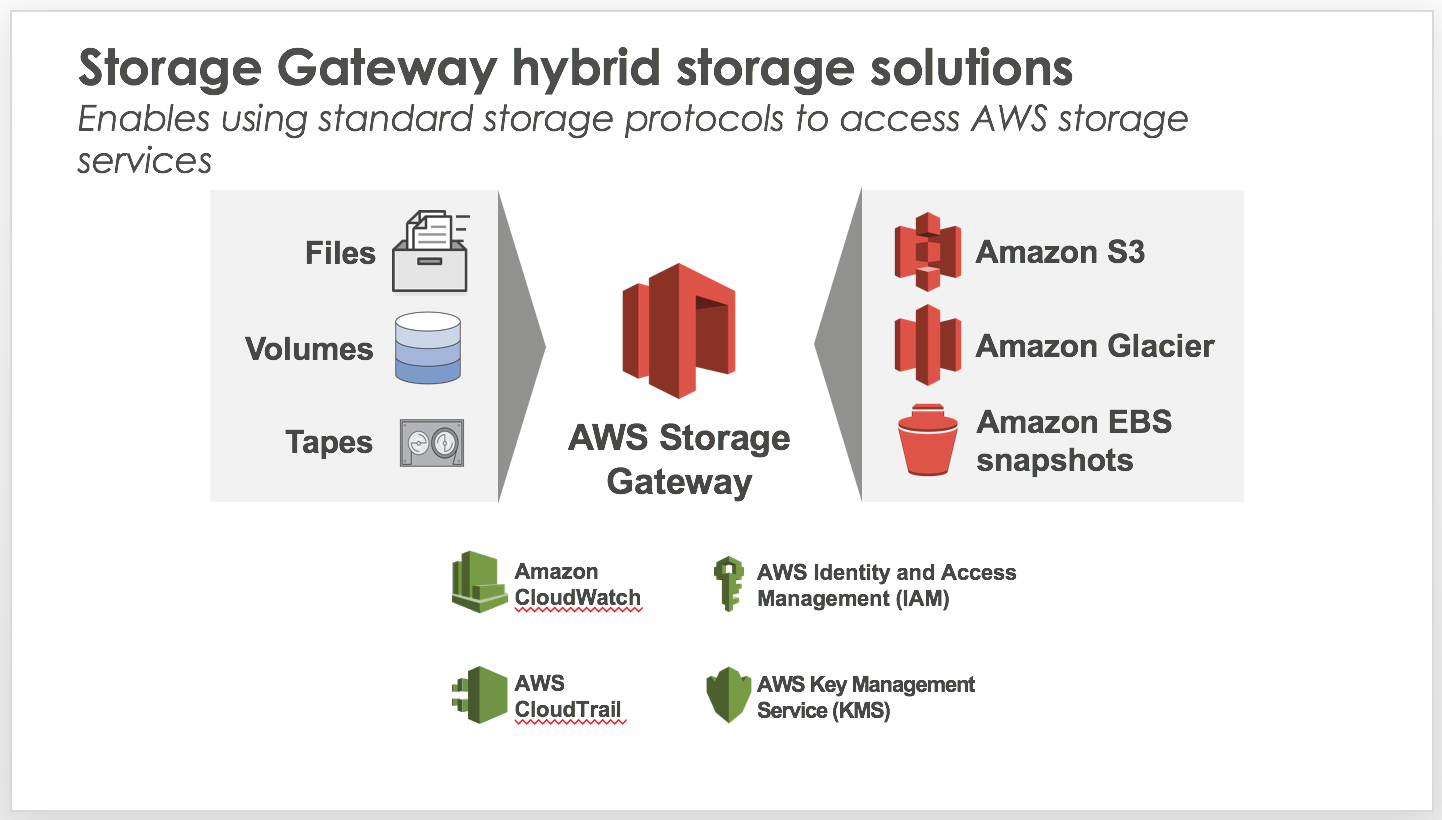
AWS Storage Gateway utilizes a VM image in your on-prem environment that securely connects to the gateway endpoint within AWS. This allows you to connect your local storage resources to the AWS cloud and enables you to add availability, fault tolerance, and scalability to your storage mechanisms. For solutions, Storage Gateway offers file-based, volume-based, and tape-based options.
- File Gateway, the file-based solution supports a file interface into Amazon Simple Storage Service or S3 and it enables you to store and retrieve objects in S3 using industry-standard file protocols such as Network File System, NFS, and Server Message Block or SMB.
- A Volume Gateway provides cloud back storage volumes that you can mount as iSCSI devices from your on-premises application servers. With this volume-based solution, you do have two configuration options. There are cached volumes and stored volumes.
- Cached volumes allows you to store your data in S3 and retain a copy of frequently accessed data subsets locally.
- Stored volumes can be a solution for when you need low-latency access to the entire dataset. All of the data is stored locally and snapshots can be made from the on-prem storage and used to either recover local volumes or create volumes inside of your AWS accounts.
- A Tape Gateway, you can durably archive backup data into AWS. A Tape Gateway provides a virtual tape infrastructure that scales seamlessly with your business needs and eliminates the operational burden of provisioning, scaling, and maintaining a physical tape infrastructure.
DataSync is a data transfer service that simplifies, automates, and accelerates moving and replicating data between on-prem storage systems and AWS storage services over the internet or AWS Direct Connect. This may sound somewhat similar to Storage Gateway but the major differences are that DataSync primarily is utilized to transfer from an NFS source and the destination can be the EFS. Similar to Storage Gateway, DataSync uses an agent which is a virtual machine that is used to read or write data from on-prem storage systems.
For more information, AWS DataSync
AWS Database Migration Service :
Database migration is a complex, multiphase process, which usually includes assessment, database schema conversion script conversion, data migration, functional testing, performance tuning, and many other steps. Read this blog for more info: Database Migration – What Do You Need to Know Before You Start?
1.AWS Database Migration Service (DMS) :
It is a tool that makes it easier to migrate relational databases, data warehouses, NoSQL databases, and other types of data stores. You can use it to migrate your data into the AWS cloud, between on-premises, or between a combination of cloud and on-premises setups. Also, if you need to perform a schema change while migrating there is an accompanying tool with DMS called AWS Schema Conversion Tool which supports converting your existing database schema from one database engine to another.
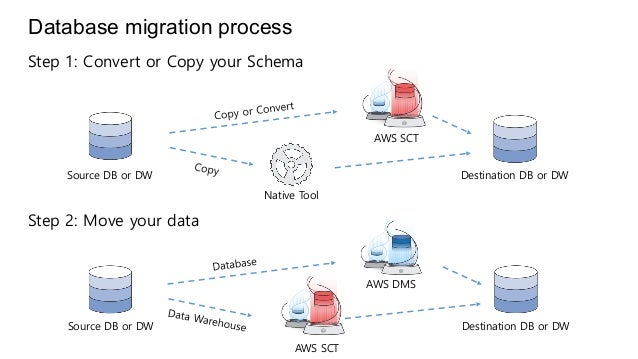
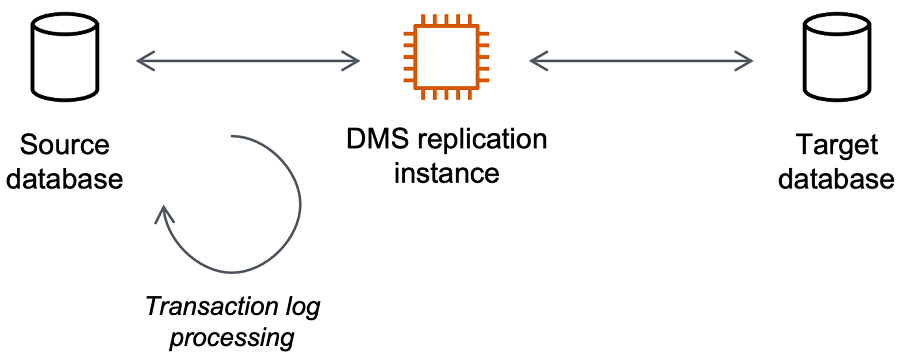
To perform a migration, DMS connects to the source data store, reads the source data, and formats the data for consumption by the target data store where it can then load the data into the target. DMS also provides the ability to monitor the migration so that you can keep an eye on everything happening. The service supports migrations to and from the same database engine, like Oracle to Oracle, and also migrations between different database platforms such as Oracle to MySQL or MySQL to Amazon Aurora. You can also use DMS to migrate your on-premises database to a database running on Amazon EC2 instances. DMS can be configured to perform an on-going replication which can allow you to migrate databases with zero downtime.
To use AWS DMS, one endpoint must always be located in an AWS service. Migration from an on-premises database to another on-premises database is not supported.
2.Aurora :
Aurora is a MySQL and PostgreSQL compatible database engine offering within Amazon Relational Database Service, known as RDS. Aurora is designed to provide multiple times the throughput of traditionally available database engines, but without having to make drastic changes in how your applications access your data. It is a fully managed and distributed system that is able to meet the higher levels of performance by utilizing an SSD-backed virtualized storage layer specifically built for database workloads. Additionally, Aurora’s storage is fault tolerant and self-healing. Disc failures are repaired in the background without loss of database availability.
Amazon Aurora Serverless, which is a configuration that can be used for Aurora, is an auto-scaling solution, where the database will automatically start up, shut down, and scale capacity up or down based on your applications needs. It enables you to run your database without the difficult task of database capacity management. With Aurora Serverless, you can create a database endpoint without specifying the DB instants class size. Instead, you set the minimum and maximum capacity. The database endpoint connects to a proxy fleet that routes the workload to the fleet of resources that are automatically scaled. Aurora Serverless manages the connections automatically. The reason that the scaling is so rapid is because it uses a pool of “warm” resources that are always ready to service requests.
Here’s a quick overview of Amazon Aurora and how Aurora Serverless works.
[Image no longer available]
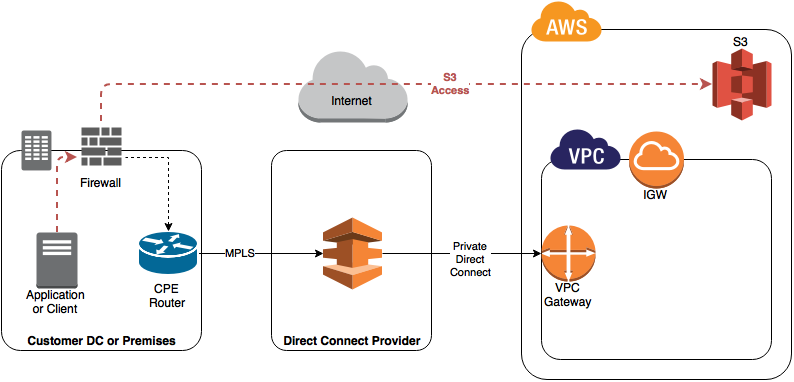
3.AWS Direct Connect & Amazon Route 53 :
During the migration, we’ll need to be able to transfer data, like our virtual machines, storage volumes, and databases. After the migration, we’ll need to be able to perform tasks like monitoring, ongoing replication, and potentially additional data transfers. AWS services are delivered over the internet. For many actions and activities we can simply use the AWS management console or AWS service APIs, which only require an internet connection to access. Many administrative tasks can be accomplished in the management console. When we start getting into automation and tools.
However, when we want to talk with our own resources running inside of AWS, there are very few occasions when we would want to make those connections or perform those tasks over the open internet.
- The first option is one that many people will be familiar with, VPN over the internet. There’s several options for creating and configuring a VPN connection. The important part for our migration is to understand that this connection establishes a secure tunnel or link from your network to AWS. With the right configuration, the resources that you have running in AWS can be seen as an extension of your on-premise network. In this example, we’re still using our internet connection to talk with AWS, and our resources in AWS, but the VPN tunnel allows for that communication to happen securely.
- If your migration or operational requirements need dedicated bandwidth to talk to AWS, or you have a requirement to not use the open internet for communication, there’s AWS Direct Connect. Direct Connect links your internal network to a Direct Connect location over a standard one gigabit or 10 gigabit ethernet fiber optic cable. With this connection in place, you can create virtual interfaces directly to the AWS cloud, for example, to Amazon EC2 and Amazon S3, and to Amazon VPC, bypassing the need for public internet in your network path.
- You can also establish a VPN tunnel over the Direct Connect link, allowing for a secure tunnel of communication from your on-premises resources to the resources in AWS. These connection options can allow for AWS to act as an extension of your network, which enables smoother data transfers, migration cutovers, and ongoing replications.
Deployment Strategies :
So let’s talk about two main deployment or cut-over methods.
1.Red-black :
In the red-black method, you have your original environment, you have the new environment, and they’re both running. You’ve set up the records and DNS for both endpoints and data is being replicated across the environments. Once everything is ready to go, you simply switch the DNS over to the new environment.
In this method, you still keep the original environment running and if you experience any issues with the migrated application, you can cut back to the original.
2.Blue-green :
Setup is the exact same with both environments being up, tested, and running and DNS setup is still there. The big difference here is that your cut-over needs to be more gradual. With this setup, instead of an instant cut-over, you’re only shifting a small percentage of traffic at a time, maybe 5%, maybe 10.
The major reason for this is to avoid downtime. In red-black, if you have an issue once traffic has been shifted, the application could be down until you’re able to move traffic back to the original environment which could negatively impact any users of the application. With blue-green, issues are less widespread and the number of affected users due to an issue is easier to manage.
Though that doesn’t mean blue-green is without its limitations.
- you have to be using a DNS service that gives you the ability to control the amount of traffic going to each endpoint. While Amazon Route 53 does have this capability, not all DNS services do.
- this method requires a lot more management. Shifting the traffic over little by little can require some manual effort which may not be wanted.
Outside of that, there is a major consideration to keep in mind for both of these methods and that is you need to have monitoring in place to evaluate if any issues are encountered. If you aren’t able to identify that errors are occurring, then it’s difficult to know whether you need to move back to the original environment or not.
Automation – AWS API Centrality :
AWS is API centric. What I mean by this is that a large majority of AWS services and tools have directly accessible APIs that you can use for creating, configuring, and managing the services you employ. The reason I bring this up is because especially when you’re trying to handle the very difficult and sensitive task of migrating data in applications across environments, handling everything manually is going to cause a lot of headache, a lot of trouble shooting, and timing is gonna be very difficult to predict and test on a large scale. If, on the other hand, you’re able to automate many of the tasks, the scale of what you can do grows exponentially.
To access the APIs within AWS, there are a couple of options.
- You can use the various SDKs that provide access to the interfaces
- You can use the AWS Command Line Interface, or CLI.
The power of these are that they allow you to create scripts and applications to handle a lot of the work not only during migration, but also when managing, optimizing, and configuring your environment post migration.
If you’re not already familiar, I highly suggest you start with the AWS CLI. This is a toolset that is easy to install locally and gives you the ability to do anything you would be able to do in the management console and more. Try out different tasks, test your various scripts, and see how it can help you.
AWS System Manager & AWS Cloud Formation :
1.ClouldFormation :
CloudFormation gives you the ability to have one or more templates that can be used to create, configure, and update your infrastructure through the CloudFormation engine.
This becomes very helpful in migrating because it gives you the ability to quickly spin up test environments that will look exactly like your production environment. You can test configurations, spin up the full environment with a few clicks or a single command, and then tear it down once you’ve gotten the data you’re looking for.
The biggest learning curve with CloudFormation comes in creating templates. But luckily for you there’s a lot of documentation and reference material on this, as well as various tools that can help you put a template together from either sample templates or from scratch.
[Image no longer available]
2.AWS Systems Manager :
You are managing your systems. Systems Manager gives you a path into the servers you are running that enables you to run commands, schedule updates, and manage various other tasks from a single point.
When managing a fleet of servers, the ability to run a command on the entire fleet without having to directly connect to any of the servers individually saves time and effort. Another major benefit of this is that it allows you to manage systems not just in AWS, but also with your on premises servers. It has this ability because it uses an agent, the systems manager agent, or SSM agent, that can be installed on both Amazon EC2 instances, as well as your servers running locally.
TSO logic :
TSO Logic is a solution that exists within AWS to provide insight into what you currently have, and give you options into what you may want to utilize, in AWS.
This can be done as a pre-migration step, or as an ongoing analysis to ensure that you are always running each application in the best place, with the right software, even as your environment and prices change.
TSO Logic provides discovery of your existing resources to help identify what you are running in your compute, storage, data base, and other areas. To help evaluate what your total cost of ownership, or TCO, is for various applications.
We then are able to use predictive analytics to help determine the best fit for your workloads in the cloud. Using data-driven methodology, and continuous visibility will help to provide on-going insights, and predictive analytics for all of your workloads.
[Image no longer available]
Cloud Endure :
CloudEndure migration simplifies, expedites, and automates large-scale migrations from physical, virtual, and cloud-based infrastructure to AWS. It automatically converts any application running on supported operating systems, enabling full functionality on AWS without compatibility issues.
Continuous data replication takes place in the background without application disruption or performance impact which ensures that data is synced in real-time and minimizes cutover windows. When migration cutover is initiated, CloudEndure executes a highly-automated machine conversion and orchestration process, allowing even the most complex applications and databases to run natively in AWS.
The continuous data protection engine works in memory, neither taking snapshots nor writing any data to disk, which means near-zero impact on performance. Furthermore, CloudEndure is designed for large-scale migrations and enables the replication of data from thousands of machines simultaneously without performance impact.
You can also manage the entire migration life cycle and verify your readiness for cutover directly from the CloudEndure console. Lastly, CloudEndure gives you the control to test your target machines as often as you like in preparation for cutover by just clicking a button.
It also provides you with the ability to quickly and easily shift your environment to AWS from existing physical or virtual data centers, private clouds, or other public clouds. As you can see, while you can work on migrating your environments yourself, using the tools and creating your own applications and automation scripts to handle your environment transfer, tools like CloudEndure can help to make the whole ordeal much easier.
[Image no longer available]
Elastic Beanstalk :
With Elastic Beanstalk, you can quickly deploy and manage applications in the AWS Cloud without having to learn about the infrastructure that runs those applications. Elastic Beanstalk reduces management complexity without restricting choice or control. This can be a useful tool for you to utilize when testing functionality of your applications in AWS. Checkout these Elastic Beanstalk tutorials and concepts for more info.
[Image no longer available]
AWS Migration Acceleration Program (MAP) :
The AWS Migration Acceleration Program, MAP, is designed to help enterprises that are committed to a migration journey. MAP was created to provide consulting, support, training, and service credits. The goal is to reduce any associated risks with migrating to the cloud, to build a strong foundation for the operation, and to help offset the initial costs.
The program includes guidance and methodologies for migrating legacy systems as well as a suite of automation tools to help speed up more common migration scenarios. AWS also maintains a partner Competency Program, which allows companies in our partner network to demonstrate and prove their expertise in areas like migrations.
[Image no longer available]
Migration Delivery Partners :
Migration Delivery Partners help customers through every stage of migration, accelerating results by providing personnel, tools, and education in the form of professional services. These partners either are, or have a relationship with, an AWS audited Managed Service Provider to help you with ongoing support of AWS workloads.
Previous Part in the series was regarding Security in AWS, http://programmerprodigy.code.blog/2020/06/03/aws-fundamentals-addressing-security-risk/
Next Part in the series is based on building sever less applications, https://programmerprodigy.code.blog/2020/06/10/aws-fundamentals-building-server-less-applications/